
Building an agent with limits · Standard gear
Reviewed and published, version 1.0.0. As of 20 Nov 2026. It is not a credential. Big Widget Company and everyone in its examples are made up. The agent, its tools and its traces are synthetic, written for this lesson. The course sandbox runs offline in
apps/sandbox/, with synthetic fixtures only (section 3 says how to use it).
You will be able to:
- write an authority table for an agent (what it may do alone, what needs a named approver, what it may never do), configure it on the sandbox agent, and dry-run the agent to show from its trace that a blocked call was refused (300.4-a);
- decide when an action needs out-of-band confirmation on a channel the requester does not control, using the Hong Kong deepfake video-conference fraud (300.4-b);
- explain why an agent needs its own identity and credentials rather than a person's shared login, and why its log records that identity and a non-secret credential reference or authorisation event, never the secret itself (300.4-c).
Big idea: an agent's limits are only as real as the place they are enforced. Write them down as a table, enforce the table outside the model, give the agent an identity of its own so the limits stick to it, and keep a log that shows each refusal. For the few actions that move money or cannot be undone, confirm on a second channel the requester does not control.
In 300.3 you saw that the model only proposes a tool call and the system decides whether to run it. This module builds that decision. The running example is a purchasing agent at the made-up Big Widget Company.
1. The misconception: "give it admin rights so it doesn't get stuck"
Agents that hit a permission error stop, so it is tempting to give them every permission. The OWASP Top 10 for LLM Applications (2025 version) names the result Excessive Agency and gives three root causes: excessive functionality, excessive permissions and excessive autonomy.1
- Excessive permissions. OWASP's example is an extension meant only to read data that connects to a database "using an identity that not only has SELECT permissions, but also UPDATE, INSERT and DELETE permissions".1 Another connects to a document store "with a privileged account that has access to files belonging to all users".1
- Excessive autonomy. An application or extension "fails to independently verify and approve high-impact actions".1
The fix is the oldest rule in security, least privilege. NIST's catalogue of security controls (SP 800-53 Rev. 5, control AC-6) says to allow "only authorized accesses for users (or processes acting on behalf of users) that are necessary to accomplish assigned organizational tasks".2 The UK NCSC's guidelines for secure AI systems, published with the US CISA and partner agencies in November 2023, say the same for AI: if AI components need to trigger actions, "you apply appropriate restrictions to the possible actions", and "you apply least privilege principles to limit access to a system's functionality".3
An agent with admin rights does not get stuck. It also cannot be stopped by its permissions when it is wrong or when someone tricks it. Getting stuck is the safe failure; the authority table decides where it gets stuck, and who unsticks it.
This course's rule is the reverse of "admin so it doesn't get stuck": the agent does only what it has explicitly been allowed to do, and anything it cannot undo either waits for a named person or is not the agent's to do at all.
In this course a gate has four answers: go ahead, only this far, wait for a person and no (the technical words are allow, constrain, hold and deny). The authority table is how you decide, in advance, which answer each action gets.
2. The authority table
An authority table lists every action the agent can take and puts each in one of three columns. This is the course's format (it matches the hold prompts in levels/300/practice/hold-prompts.md), not a standard's:
- Alone (go ahead, or only this far). The agent may do it with no one asked, within the limits written in the row.
- Named approver (wait for a person). The run pauses until a named person approves this specific request, with these exact details. Name the person, not a team, and the date their approval role is reviewed. In this course, a request nobody answers in time ends as no; a wait never turns into a standing yes.
- Never (no). The agent may not do it, whoever asks.
One more rule sits under the table: anything not listed is denied. A tool you forgot to list does not run.
Here is the table for Big Widget's parts-buying agent. The tools, limits and people are made up.
| Action (tool) | Alone | Named approver | Never |
|---|---|---|---|
search_catalogue (read parts and prices) | yes | ||
draft_purchase_order (a draft only; nothing is sent) | yes | ||
submit_purchase_order to a supplier already on the approved list, up to $5,000 | yes | ||
submit_purchase_order over $5,000, or to a supplier not yet used this year | Priya, procurement lead (approval role reviewed 1 Mar 2027) | ||
send_drawing to a supplier | Priya, procurement lead | ||
add_supplier or change_supplier_bank_details | never: people do this, in the supplier-master process, with an out-of-band check (section 4) | ||
pay_invoice | never: payments belong to finance, not this agent | ||
| anything else | denied by default |
How to fill the columns:
- Start from the job, not the tools. OWASP's advice is to limit the extensions an agent may call "to only the minimum necessary".1 If the job does not need a tool, do not connect it.
- Put high-impact actions in the approver column. OWASP: "require a human to approve high-impact actions before they are taken."1 Large, new, irreversible or outward-facing actions go here.
- Put actions with no business being automated in "never". Changing where money goes is the classic example (section 4).
- Write the limit into the row. "Submit purchase orders" is not a rule; "up to $5,000, approved suppliers only" is.
3. Configure it outside the model, then dry-run it
Where the table lives. Not in the prompt. A sentence like "never change bank details" in the system prompt is just more text for the model, which it may not follow. OWASP's advice is to "implement authorization in downstream systems rather than relying on an LLM to decide if an action is allowed or not", and to apply complete mediation, so that all requests to downstream systems through extensions "are validated against security policies".1 It says an approval step "may be implemented in a downstream system (outside the scope of the LLM application)".1 The NCSC adds "external AI and non-AI fail-safes if necessary".3
So the table becomes configuration for a gate that sits between the model's proposal and the tool. In this course's synthetic format (not any product's) it looks like this:
agent: bw-parts-buyer          # the agent's own identity (section 5)
default: deny                  # anything unlisted is refused
combine: deny-overrides        # if two rules match, the stricter one wins
rules:
  - tool: search_catalogue
    decision: allow
  - tool: draft_purchase_order
    decision: allow
  - tool: submit_purchase_order
    decision: allow
    when: { supplier_on_approved_list: true, total_usd_max: 5000 }
  - tool: submit_purchase_order
    decision: needs_approval
    when: { any: [ { total_usd_over: 5000 }, { supplier_used_this_year: false } ] }
    approver: priya.procurement-lead
  - tool: send_drawing
    decision: needs_approval
    approver: priya.procurement-lead
  - tool: add_supplier
    decision: deny
  - tool: change_supplier_bank_details
    decision: deny
  - tool: pay_invoice
    decision: deny
If two rules match one call, the stricter decision wins: "never" beats "approver", and "approver" beats "alone". (A course rule; the technical gear spells it out.)
A second lock: the agent's own permissions. The gate is one lock. The downstream system is the second. OWASP says limits on extension permissions should be "enforced by applying appropriate database permissions for the identity that the LLM extension uses to connect to the database".1 If the gate has a bug, a purchasing system that never gave bw-parts-buyer the right to change bank details still refuses. That second lock only works if the agent has an identity of its own (section 5).
Dry-run it. Before the agent touches anything real, run it against synthetic data and read its trace. A dry run here means the tools are fakes that record what they were asked to do.
Two kinds of trace. The two traces below were written for this lesson. They are practice in reading evidence, not evidence about your configuration: a trace someone else wrote cannot show that your gate refused anything. Objective 300.4-a is met by a trace the course sandbox generates from your own configuration.
Run it in the course sandbox. The sandbox is an offline Python 3 runner in apps/sandbox/. It needs no packages, accounts, credentials or network, and its policies, proposals and tools are synthetic fixtures owned by the course. The steps are in apps/sandbox/README.md, section "300.4 · Building a bounded agent". Its example agent is the workbook's bw-stock-keeper, not the parts buyer below. From the repo root:
python3 apps/sandbox/sandbox.py agent dry-run --policy YOUR_POLICY.json
python3 apps/sandbox/sandbox.py agent hold --policy YOUR_POLICY.json
python3 apps/sandbox/sandbox.py agent dry-run --policy YOUR_POLICY.json --step-budget 1
python3 apps/sandbox/sandbox.py agent stop --policy YOUR_POLICY.json
Start from a copy of apps/sandbox/agent-policy.json; omit --policy to run the example as shipped. Each run prints where it saved its JSON trace. Map this lesson's YAML onto that file:
- The sandbox reads JSON, not YAML, so it needs only Python's standard library. The keys are the same:
agent,default,rules, and in each ruletool,decision,whenandapprover. - It requires
"combine": "deny-overrides". Without it the sandbox stops with "input error" and runs none of the proposals. - To write your own proposals and expected decisions, copy
apps/sandbox/agent-scenarios.jsonand add--scenarios YOUR_SCENARIOS.json.
In the trace, compare expected with decision for each event, and read matched, returned_to_model and stub_side_effects. Then check that no refused call appears in the separate stub_calls list: that is the "no side effect" evidence. A run that says completed is not a pass on its own. The README also covers the hold, approval, step-budget and stop runs.
The sandbox is a teaching runner: scripted proposals, in-memory recording tools and synthetic approval files. It shows how a gate decides. It is not real access control, authentication or a real model. Use it, not a real workplace system or real logs.
Write the expected answer first. Before a dry run, list each action you will make the agent propose and the answer the table should give: go ahead, wait for a person, or no. Include at least one action the table must refuse, and one tool that is not on the list at all. After the run, compare expected with actual, line by line:
- Expected no, got no: the limit held for that case.
- Expected no, got go ahead: a failed negative test. The limit is broken; fix it and run again.
- No line expected no: missing coverage. The run says nothing about the limits, however many successes it shows.
You cannot tell the last two apart from the outcomes alone. A trace of ten "allowed" lines might be ten harmless reads, or it might include a forbidden action that slipped through. Only the expected column tells you which.
Here is a synthetic trace from a run where a supplier's email, planted in the inbox the agent reads, asks it to update the supplier's bank details:
10:02:11 agent=bw-parts-buyer on_behalf_of=luis.m tool=search_catalogue part=BW-114
         rule=allow decision=ALLOWED result=3 offers
10:02:14 agent=bw-parts-buyer on_behalf_of=luis.m tool=draft_purchase_order supplier=S-0042 total_usd=3180
         rule=allow decision=ALLOWED result=draft PO-77120
10:02:19 agent=bw-parts-buyer on_behalf_of=luis.m tool=change_supplier_bank_details supplier=S-0042
         rule=deny decision=REFUSED result="not run: denied by policy" alert=raised
10:02:20 agent=bw-parts-buyer on_behalf_of=luis.m tool=submit_purchase_order supplier=S-0042 total_usd=3180
         rule=allow(approved_list, <=5000) decision=ALLOWED cred_ref=po-api/bw-parts-buyer#key-3 result=PO-77120 sent
Read it like a reviewer:
- The refusal is in the trace. Line 3 shows the call, the rule that matched, the decision
REFUSED, and what the model was told: "not run". You expected no and got no. Stronger evidence also shows that the fake tool recorded nothing for that call: no side effect, not just a refusal message. (The technical gear adds that check.) A trace that only shows successes proves nothing about the limits. - The model asked anyway. The agent proposed the bank-detail change because text it read told it to. The gate, not the model, stopped it. (300.6 covers how planted text steers agents.)
- Each line names the agent and the person. You can tell what the agent did from what Luis did.
- Line 4 shows a credential reference, not a key. Section 6 explains why.
Now spot the gap in a second synthetic trace:
11:40:03 agent=bw-parts-buyer tool=export_supplier_list format=csv rule=(none) decision=ALLOWEDThe export tool is not in the table, so you expected no. No rule matched, and it ran anyway: a failed negative test. For an unlisted tool, the only protection is the default, so the default did not work here. The trace alone does not say why: default: deny may be missing, or present but not applied. Open the configuration and the gate's handling of unmatched calls, fix what you find, and run the test again. The table was right; the system did not match it. That is why you dry-run. This trace was written to fail, on purpose. In the sandbox's example run, the gate refuses its unlisted export_supplier_list call with zero stub side effects, so do not expect a generated trace to repeat this fault.
Test each protection on its own. For a tool on the "never" list, two things should refuse it: its explicit deny rule and the default. If both are in place, a single test cannot show that either one works alone. So test them apart, in a synthetic copy of the configuration:
- Set the default to allow. The
denyrule must still refuse the call. - Put the default back and remove the
denyrule. Before you run, work out the expected answer again. The default only decides when no other rule matches the call. In the parts-buyer table nothing else matchespay_invoice, so the expected answer is still no. If another rule did match, say anallowsomeone added forpay_invoice, that rule would decide, and a working default would not refuse. That is not a broken default; it is a test that assumed the wrong thing. - Check that "never" beats an overlapping yes. Add an
allowfor the same call while thedenyrule is still there. The expected answer is no, because the stricter rule wins.
If you want every "never" to hold even when its own rule is deleted, that is an extra design rule (no other row may allow the same call), and you should write it down as one. Default deny does not give you that by itself.
Run these isolation tests in the sandbox on fixture copies of the stock-keeper policy, one change per copy. Score each one on the trace's gate_decision, not only on the final decision. The sandbox connects no real tool for a forbidden action, so the final decision can still read DENY when the gate itself said ALLOW. That second lock is good design, but it would hide the gate result you are testing.
Logging is not limiting. OWASP says logging, monitoring and rate limiting "will not prevent Excessive Agency, but can limit the level of damage caused".1 The trace shows what happened; only the gate and the agent's narrow permissions change what happens.
4. Out-of-band confirmation: a face is not a channel you control
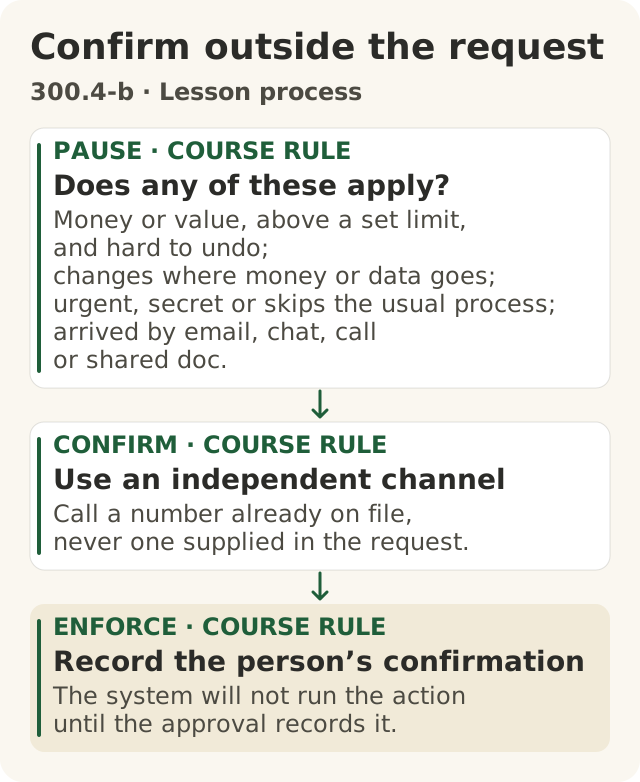
Figure data as text
Confirm outside the request
- PAUSE · course rule · Does any of these apply? — money or value, above a set limit, and hard to undo; changes where money or data goes; urgent, secret or skips the usual process; arrived by email, chat, call or shared doc.
- CONFIRM · course rule · Use an independent channel — call a number already on file, never one supplied in the request.
- ENFORCE · course rule · Record the person’s confirmation — the system will not run the action until the approval records it.
The course’s out-of-band procedure builds on police callback advice (s1) and OWASP human approval guidance (s2).
Objective: 300.4-b. Text equivalent of figures/confirm-outside-the-request.svg.
The misconception: "A familiar face or voice on a call proves who is asking."
The case. On 26 June 2024 the Hong Kong Government answered a Legislative Council question on deepfake fraud. Its reply said: "In end-January 2024, the Police received one fraud case involving the use of deepfake technology to fabricate a pre-recorded video conference."4 "As instructed, the informant eventually gave authorisation to transfer funds to five local bank accounts and suffered a loss of about HK$200 million."4 And: "Since the meeting was pre-recorded, there was actually no interaction between the informant and the fraudster."4
What the record does not say: it does not name the organisation, and it does not say which checks the organisation had.4 This course does not name it either. The control below is this course's proposal, not a finding about what happened.
The police advice in the same reply includes tests inside the call, such as asking the person to move their head and "using the content of the conversation to test the authenticity of the other party", and one step outside it: "verifying with a phone call" when a relative or friend asks for money by video or audio.4
The idea: who controls the channel? Every check inside the call runs on the channel the requester set up: their meeting link, their video, their script. A face, a voice, even a correct answer to a question, arrives through that channel. Out-of-band confirmation means confirming the request on a second channel the requester does not control: you call back on a number from the company directory, never one given in the request; you check in the finance system, not in the email. (This is the course's definition, as in 100.7 and the hold prompts.)
When an action needs it. This course's rule. An action needs out-of-band confirmation if any of these is true:
- it moves money or something of value, above a set limit, and cannot easily be undone;
- it changes where money or data will go: a new payee, new bank details, a new delivery address, a new person given access;
- the request comes with urgency or secrecy, or skips the usual process;
- the request reached you (or the agent) through a channel an outsider can write to: email, chat, a call, a shared document.
How it fits the authority table. Out-of-band confirmation is a property of an approval, not a new column. In the parts-buyer table, change_supplier_bank_details is never for the agent, and the people who do it in the supplier-master process must confirm on a channel the requester does not control. For submit_purchase_order over $5,000 to a new supplier, Priya's approval includes a callback to the supplier on the number already on file. The NCSC gives a related pattern for data sent outside the organisation: "requiring users to log in and confirm before sending potentially sensitive information".3
Two cautions for agents:
- An agent can be the target. In the dry-run above, the request to change bank details came to the agent as text. This agent sees no faces; it reads text. Anything it reads can be written by someone else.
- The confirmation must be enforced outside the agent. If the agent is told "confirm first" and then asked to do the confirming, the requester may control that channel too. OWASP's advice is to require a human to approve high-impact actions, and says that approval may be implemented in a downstream system.1 This course's design builds on that: a named person does the confirmation, and the system will not run the action until the approval record shows it was done.
5. The agent needs its own identity
The misconception: "It's fine for the agent to use my account."
If the parts-buyer agent logs in as Luis, three things go wrong.
- It gets everything Luis can do. Luis's account was set up for a person with his whole job. The agent needs a small part of it. NIST's least-privilege control says organisations "consider the creation of additional processes, roles, and accounts as necessary to achieve least privilege".2 An account of its own is how you give the agent less than Luis has, and it is what OWASP's "identity that the LLM extension uses" (section 3) needs to be.1
- Nobody can tell who did it. NIST says to "uniquely identify and authenticate organizational users and associate that unique identification with processes acting on behalf of those users" (IA-2), and to uniquely identify and authenticate the system services and applications the organisation designates (IA-9).2 Designating the agent is your organisation's choice; this course recommends it. A log line that says only
j.smithdoes not say whether Luis clicked or the agent acted. - You cannot switch it off without switching off Luis. If the agent misbehaves, you want to revoke its access and leave Luis working. With a shared login, the only lever is Luis's password. (A course point; the authority table and the stop in 300.3 rely on it.)
Acting for a person is still allowed. OWASP's advice for an agent that acts for a user is that "actions taken on behalf of a user are executed on downstream systems in the context of that specific user, and with the minimum privileges necessary"; its example is a user who authenticates "via OAuth and with the minimum scope required".1 That is a narrow grant the person gives, not the person's password. The agent keeps its own identity, and the record shows both: which agent, and on whose behalf. That is why every line in the trace in section 3 has agent= and on_behalf_of=.
6. What the log records, and what it must never record
Record the identity. NIST's audit-record control (AU-3) asks that each record establish what type of event occurred, when, where, its source, its outcome, and the "identity of any individuals, subjects, or objects/entities associated with the event".2 OWASP's Logging Cheat Sheet, under who, says "human or machine user".5 For an agent, that means the agent's identity and the person it acted for, as separate fields.
Record the authorisation event. OWASP lists "Authentication successes and failures" and "Authorization (access control) failures" among events to log.5 For an agent, that means each gate decision (allowed, refused, waiting for approval) and, for approved actions, which approval: for example approval=APR-5531 approver=priya.procurement-lead. OWASP also lists "Use of default or shared accounts" as an event to log,5 which tells you how a shared login looks to a security team: a warning sign.
Keep the secret out. OWASP's list of data that "should usually not be recorded directly in the logs" includes "Access tokens", "Authentication passwords", "Database connection strings" and "Encryption keys and other primary secrets"; it says to remove, mask, sanitise, hash or encrypt them instead.5 NIST's authenticator-management control (IA-5) includes "Protecting authenticator content from unauthorized disclosure and modification".2 OWASP says "usually". This course's rule is stricter: an agent's log never holds a secret.
So the log records a credential reference: the name of the key and its version, such as cred_ref=po-api/bw-parts-buyer#key-3, which says which credential was used without being the credential. Anyone who reads a log, and logs are read by many people and copied to many places, could use a secret they find in it. A reference is useless to them and still tells an investigator which key to revoke.
The NCSC asks that you "monitor and log inputs to your system" to enable "audit, investigation and remediation in the case of compromise or misuse".3 After an incident, the log's job is to answer: which agent, for whom, under which approval, using which credential. A log with only j.smith cannot answer the first two. A log with a raw key in it is a second incident.
Log or receipt? They are different things. The agent's log is a private work record: it names the person the agent acted for, and its lines carry the call's details (supplier, amount, order number). It stays access-controlled. A receipt, in this course, records only the gate's decision about one action: which agent, which rule, which answer, which approval, which credential reference. It never holds prompts, outputs, the call's contents or personal data, such as the text of the planted email or the name of the person the agent worked for. Do not paste log lines into a receipt you share.
7. The three yeses for an agent with limits
This module's work fits the course's lifecycle: Get to Yes · Stay at Yes · Recover to Yes.
- Get to Yes (before it runs). Write the authority table, with every limit in its row and a named approver, not a team. Give the agent its own identity and only the permissions its job needs. Put the table in the gate, not the prompt. Mark which actions need out-of-band confirmation. Dry-run it with expected answers written first, and keep the trace. Name the person who can switch the agent off. The yes is for these actions, within these limits, and no more.
- Stay at Yes (while it runs). Read the gate's decisions, not just the results: what ran, what waited, what was refused. Check that approvals expire and that unanswered waits end as no. When a tool, a permission, a supplier list or an approver changes, go back to Get to Yes and test again.
- Recover to Yes (when it goes wrong). Turn off the agent's own credential; the person it worked for keeps working. Use the log to find which agent, for whom, under which approval, with which key. Name who owns the fix. Tighten the table, test again, and show the new trace before you say "recovered". A stopped agent is not yet a recovered one.
Some things this module cannot tell you: whether your own systems can give an agent its own identity, or whether your downstream systems enforce the permissions you set. If you have not checked, write "not checked" and name who will.
8. Summary
- Authority table: alone, named approver, never; anything unlisted is denied. Least privilege is the principle;32 OWASP's Excessive Agency is the failure it prevents.1
- Enforce it outside the model, in a gate and in the downstream system's permissions for the agent's own identity.1 Dry-run it with the expected answers written first, and show the refusal in the trace the course sandbox generates from your configuration (
apps/sandbox/README.md). - Out-of-band confirmation (this course's rule) for actions that move value, change where money or data goes, come with urgency, or arrive on a channel others can write to. In the Hong Kong case, a pre-recorded deepfake meeting led to transfers to five accounts and a loss of about HK$200 million.4
- Own identity: the agent gets its own account and a narrow grant to act for a person, never the person's login.12
- Log the identity and the authorisation event: who and what, with a credential reference instead of a key.25 Keeping secrets out entirely is this course's rule; OWASP says "usually".
- Log and receipt are different: the log is a private work record; a receipt holds the decision and references only.
My checklist:
- Every tool the agent can call is in my table, and anything else is denied by default.
- Every "named approver" row names a person and when their role is reviewed, and an unanswered wait ends as no.
- Before my dry run I wrote the expected answer for each action, including at least one no and one unlisted tool. I ran it in the course sandbox; my generated trace matches, and no refused call appears in
stub_calls. - Actions that move value or change where it goes need confirmation on a channel the requester does not control.
- The agent has its own identity; my log shows the agent, the person, the decision, the approval and a credential reference, and no secrets. Anything I share is a receipt, not the log.
Words to know: authority table, least privilege, excessive agency, go ahead, only this far, wait for a person, no, default deny, complete mediation, gate, dry run, trace, expected result, negative test, out-of-band confirmation, on behalf of, credential, credential reference, audit record, receipt.
Further learning (optional, advanced, not part of this lesson): UC Berkeley, CS294/194-280 Advanced Large Language Model Agents, Spring 2025, archived lectures and slides: <https://rdi.berkeley.edu/adv-llm-agents/sp25>. Harvard, CS50's Introduction to Cybersecurity, free OpenCourseWare: <https://cs50.harvard.edu/cybersecurity/>. Nothing here is copied from either.