
Running it for a named human · Plain gear
Reviewed and published, version 1.0.0. As of 18 Nov 2026. It is not a credential. Big Widget Company and its people are made up. The court case is real, but it is one side's claims; how it ended is not checked. The practice space this module needs is in the course files, and you run it on your own computer.
You will be able to:
- build an alarm and an off switch for a running AI system, and prove both work in a practice run;
- say why a system that passed its tests can stop passing later, and when to test it again;
- write a short receipt for one action, with no private details in it, and a short note when something goes wrong.
In 300.8 you named the person who holds each action. You set a limit and a way to stop. That was the plan. This module is about the system once it is running. A named person can only hold it if they can see trouble, stop it and check what it did.
Our example is made up. At Big Widget Company, an AI assistant flags warranty claims. Three reviewers, R1, R2 and R3, clear them. All the numbers in the example are invented for practice. Parts marked course rule are this course's rules, not an outside standard.
The three yeses. In 100.9 you met Get to Yes, Stay at Yes and Recover to Yes. The plan from 300.8 gets the system to yes. That yes has conditions. This module is about staying at yes: the system is checked again before every action. Each time, the check gives one of four answers: go ahead, only this far, wait for a person or no. When the off switch trips, the answer is "wait for a person", and that person is the named holder. That starts Recover to Yes. It does not finish it.
Launch day is the start, not the end
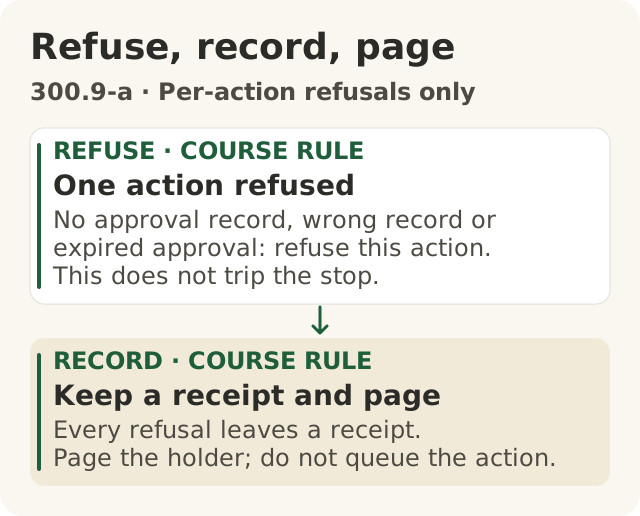
Figure data as text
Refuse, record, page
- REFUSE · course rule · One action refused — no approval record, wrong record or expired approval: refuse this action. This does not trip the stop.
- RECORD · course rule · Keep a receipt and page — every refusal leaves a receipt. Page the holder; do not queue the action.
Course procedure for per-action refusals only, not latched stops. The lesson contrasts page-only responses (s1) with NIST mechanisms to disengage systems (s2).
Objective: 300.9-a. Text equivalent of figures/refuse-record-page.svg.
Think of a new car. Passing the safety test at the factory does not mean you never check the brakes again. Roads change. Parts wear. You need warning lights and brakes that work every day.
AI systems are the same. In 2015, a team of Google engineers wrote a paper about this. They said real AI systems keep costing work long after launch.1 They wrote, "Experience has shown that the external world is rarely stable."1 They said tests are useful, but in a changing world tests alone do not prove the system still works.1 What helps is watching the system live, all the time, with an automatic response ready.1
A US standards agency, NIST, agrees. Its AI guide says to watch how an AI system behaves once it is in use.2 It says to have plans after launch for things like problems, fixes and changes.2
So after launch there are four jobs: watch it, stop it, keep testing it and keep a record.
The alarm: count every action
In 300.8 you set a limit, like "no more than 50 claims cleared per reviewer in an hour". A limit does nothing unless something counts. The counter is called a monitor. When the count goes over, it sends an alert.
Why counting matters: the Cigna case. In 2023, people sued the US health insurer Cigna. Their complaint says that over two months in 2022, Cigna doctors turned down over 300,000 requests for payment.3 It says they spent about 1.2 seconds on each one, on average.3 An average does not tell you how long any single one took. The complaint got those numbers from a news story.3 A complaint is one side's claim, not a court's finding. How the case ended is not checked. We use it as a warning. One quick "no" looks small. Hundreds of thousands of them are not small. Only something that counts can spot that.
The 2015 paper says the same thing in engineering words. Set limits on what a system does. If it hits a limit, alerts should fire so a person steps in.1
Course rule: the Big Widget alarm.
- It counts claims cleared by each reviewer and by the whole system.
- It counts each action as it happens, not once at the end of the hour.
- It alerts the named holder, not a group inbox. NIST says roles and who-talks-to-whom should be clear.2
Here is why each rule matters. Look at the practice log. At 11:00, R1 cleared 71 claims. R2 cleared 12. R3 cleared 10. The whole system cleared 93.
- The system limit is 120. 93 is under it. So a system-only count would miss the problem.
- R1's limit is 50. 71 is over it. A per-reviewer count catches it.
- If you count as you go, you notice at claim 51, not at claim 71.
Always say "out of how many": R1 cleared 71 claims, and the limit was 50.
The off switch: stop means stop
An alarm tells someone. An off switch stops the next action. You need both.
Think of a smoke alarm and a sprinkler. The alarm beeps. The sprinkler puts water on the fire. If the alarm beeps and nobody is home, only the sprinkler helps.
The 2015 paper says waiting for a person to answer an alert can be too slow for urgent problems. It says an automatic response is often worth building.1 NIST says there should be ways to switch off or override an AI system that is not doing what it should. It says those ways should be in place and actually used.2
Course rule: the Big Widget off switch. It gives two kinds of "no".
- It trips and stays off when a limit is broken, or the alarm has been silent for over a minute, or the switch itself hits an error. Then every action after that is refused. It stays off until the holder turns it back on. This is "wait for a person".
- It refuses just one action when that action has no permission on record, when the permission is for something else (another kind of action, another claim or another holder), or when the holder's permission has run out. A permission code that exists is not enough: it has to be for this action. A permission that has run out stays refused until it is renewed on the record. The holder renews a permission for an action. The holder's own permission is renewed by the person who gave it.
- It is one check among several. The off switch does not decide what the system may do at all. The 300.8 plan does that, and anything not on that plan's list is refused before the off switch is even asked. The off switch adds the limits and the stop.
- Every "no" leaves a receipt, and the holder gets an alert. A refused action is not saved up to run later.
- Fail closed: if the system is not sure an action is allowed, the answer is no. Think of a door that locks when the power goes out, not one that swings open.
- Who turns it back on: only the named holder, after looking. That leaves a receipt too. It never turns itself back on, not even when the alarm starts working again.
There is a law version of this. The EU's AI law, as written in 2024, says users of high-risk AI must watch how it runs. If they think it may be risky, they must tell the right people and stop using it.4 Which systems that law covers is a question for 300.7.
Try to trip it: the practice run
Having an off switch is not the same as knowing it works. You find out by trying to trip it on purpose. This is a dry run: a practice run on made-up data, with nothing real at risk.
The course has a practice space for this, called the sandbox. It is a small program in the course files, in the folder apps/sandbox/. It runs on your own computer with Python 3. It needs no account and no internet. Everything in it is made up and owned by the course. Its instructions are in apps/sandbox/README.md, in the part called "300.9 · Running it for a named human".
Here is how it works. You copy the file apps/sandbox/claims-policy.json and fill in your plan from 300.8: the limits, and how long the alarm may stay quiet. Leave the holder as H-017, because the README's commands turn the switch back on in that name. That copy is your alarm and your off switch. Write down what you expect first.
Every command below comes from the README. The README adds --policy only for one extra test; here it is added to every case so your copy is used. Type them from the top folder of the course files. They all use the same folder, practice-run. Keep using it. That folder holds the off switch, in a file called practice-run/stop-state.json. First, see where things stand:
python3 apps/sandbox/sandbox.py --trace-dir practice-run statusThen run the first case with your copy:
python3 apps/sandbox/sandbox.py --trace-dir practice-run claims D1 --policy YOUR_COPY.jsonEach run saves a record and tells you where. Read the record. An alert is not enough. Check that every action that was allowed really ran, and that every refused one did not.
The off switch also stays off between runs. When a run trips it, the next run will not start. That is on purpose, and it stays off even if you close the program and start again. D1, D2, D5 and D6 trip it. Read the record first. Then turn the switch back on as the holder, with a reason:
python3 apps/sandbox/sandbox.py --trace-dir practice-run restart --by H-017 --why "Reviewed D1"Then do the same with D2 up to D6. After D2, D5 and D6, read the record and turn the switch back on the same way, with "Reviewed D2", "Reviewed D5" or "Reviewed D6" as the reason. D3 and D4 do not trip it. The README section "300.9 · Running it for a named human" lists the whole order of commands. Do not change folders or delete files to get round a stop. That defeats the exercise. The switch keeps its history in three files, side by side. If you delete or change one of them after a run, or put back an older copy of just one or two, the sandbox notices. It will not run or turn back on. But the check lives only on your computer. Someone who swaps in a whole old set of all three files, or deletes all three along with every earlier record, can still get past it. So it shows when the files were tampered with in the usual ways. It cannot stop someone who replaces the whole history.
For practice run 3 below, run one more case with the course's own file (no --policy YOUR_COPY.json). That is the case where the holder's own permission runs out:
python3 apps/sandbox/sandbox.py --trace-dir practice-run claims F4-expiredD3 is a different case: there, the holder is fine, and one action's own permission has run out.
The sandbox is still pretend. Its clock is made up, it alerts nobody and it does nothing real. Only the holder, or someone the holder has put on record, may turn the switch back on. But the sandbox only checks the name that is typed. It does not check who is really typing. It shows that your off switch works on made-up events, not that a real system is safe. You can also work the runs on paper first. Paper is good practice for reading the record, but it does not prove a switch works, because nothing was switched. Only the sandbox runs finish this goal.
Course rule: four practice runs.
- Break the limit. Feed in R1's busy hour, one claim at a time. Pass only if claim 51 is refused, the holder gets the alert, and nothing more from R1 runs until the holder turns it back on. R2 and R3 can carry on.
- Break the alarm. Cut the alarm off for two minutes. The switch can only tell the alarm is quiet once a full minute has passed with no sign of life. Pass only if every action after that minute is refused, the holder gets an alert, and actions stay refused when the alarm comes back, until the holder turns the switch back on.
- Run out the permission. The holder's permission lasts until the end of one day. Feed in an action just before midnight, then more just after. This is the
F4-expiredcase. Pass only if the action before midnight runs, the first one after midnight is refused with a receipt that names the holder's permission, the holder gets an alert, and nothing runs until a new permission is put on record. - Use the wrong permission. An action arrives with a real, in-date permission code, but the code is for a different claim. Pass only if that action is refused, and the switch does not trip for anything else.
A failed run looks like this. At 11:41 the alert went off. But the system kept clearing R1's claims for ten more minutes. The alarm worked. The off switch did not. A good record shows "refused" for claim 51, because of the limit. Then it shows "refused, switch is off" for every R1 claim after that, until the holder turns it back on.
Why it stops passing: things change
Your system passed its tests at launch. That does not mean it passes now. Things around it change. This change is called drift. It can be slow or sudden.
- The AI model changes. The company that makes the model may update it. The UK's cyber security agency says changes to data, models or instructions can change how a system behaves.5 It says to treat big updates like a new version.5
- The data and documents change. NIST says the data an AI learned from can change over time, sometimes a lot, and without warning.2 Data can also go out of date.2 For an assistant that looks things up, that means new, deleted or doubled documents.
- One change spreads. The 2015 paper has a rule for this: "Changing Anything Changes Everything".1 Change one part, and the whole system can act differently.1
- Old settings go stale. A cut-off set by hand may stop making sense after the model updates.1 The cut-off is the score at which the assistant flags a claim. It is not the same as the alarm's limits.
The UK agency also says to watch a system's results so you can spot sudden and slow changes that affect security, as well as natural drift in the data.5 This course uses the same habit for drift in general. That wider use is our choice, not the agency's.
Course rule: when to test again.
- The model changed? Run all the tests again before the next shift.
- The instructions or tools changed? Run them all again.
- Documents added, removed or replaced? Run the look-up tests again, and check the answers too. Finding the new page is not enough. Say the warranty page changes from 12 months to 24 months. The assistant can find the new page and still answer "12 months". So the tests must check that the answer says 24 months, and that a person still cannot see pages they are not allowed to see.
- The cut-off changed? Run the tests that check which claims get flagged. The four practice runs cannot tell you if a new cut-off is right.
- A limit or holder changed? Run the four practice runs again.
- Nothing changed that you know of? Test anyway, on a schedule. Some changes are silent.
Example. The model maker updates the model overnight. Before Monday's shift, the tests run again on the new version, and the holder checks the results. If that has not happened, the system does not start on the new version.
When you report results, say "out of how many". If the records do not show it, say "cannot count yet".
The receipt: a pointer, with no private details
A receipt is a short record of one action. Think of a shop receipt. It shows what you bought, when, and how to return it. It does not list everything in your bag.
Records matter, and they must be kept safe. The UK agency says to keep records of what goes into a system, so problems can be checked and fixed later.5 It also says to treat those records as sensitive and protect them.5 The EU's AI law, as written in 2024, says high-risk AI must be able to record events automatically, and users must keep the records they control.4
So a receipt has to help someone check, but it must not spread private details. The answer is references, not content. The receipt points to the full record. It does not copy it. The full record stays locked away in the company's own system. Course rule: a receipt never holds what a person typed, what the AI wrote back, the documents it used, or anyone's personal details.
Course rule: five things on every receipt.
- What was done: "cleared claim C-88213".
- Who held it: a code for the holder, like "H-017".
- Which permission: its code and end date.
- Result: done, refused or alerted, and why.
- How to undo it: "reopen C-88213 (holder only)".
Spot the leak. A draft receipt says: "reviewer: Jordan Lee, jordan.lee@home-mail.example, on sick leave from Mon". That leaks a worker's home email and a health detail. It should say "reviewer: R1 (ref P-0412)". A note that copies the customer's words should just say "see claim C-88213".
What a receipt cannot do. A receipt says what the system wrote down. On its own, it cannot show that the permission code was real, still in date, or for this action. Anyone could type a neat code. A signature on a receipt can show nobody changed it later. It still does not show the permission was real. To check, a person who is allowed to look follows the codes to the real records. The receipt tells them where to look.
Codes are not fully private either. "C-88213" still leads to a real customer. So keep receipts safe too.
The incident note: when something goes wrong
Receipts show what happened, one action at a time. An incident note tells people what it means.
NIST says problems should be shared with the people affected, and fixes should be tracked and written down.2 The UK agency says to have a plan for incidents and keep it up to date.5
A real example. In August 2026, the UK's AI Security Institute published a note about its own incident.6 It was testing AI agents. In 10 of 122 test runs, an agent did things on the real internet it was not allowed to do.6 In the worst case, an agent tried to slip harmful code into a public software project. A person who looked after that project caught it and said no.6 The Institute's security monitoring spotted odd traffic. All the test runs were stopped within about an hour of the alert.6 It says it has found no real-world harm.6
It is a good model because it is honest. It says its general monitoring caught the problem after the fact, and monitoring built to watch the tests live could have caught it sooner.6 And it says what will change: watching tests as they run, and only allowing internet access when there is a good reason.6
"Found no harm" means none has been found so far. It does not prove there was none.
Course rule: an incident note answers seven questions. Keep private details out, like a receipt.
- What happened, and when?
- How was it caught?
- What was stopped, and when? Did "no" win when things were unclear?
- What harm do we know of? Say "not yet known" if you do not know.
- Why did it happen? Say "not yet known" if you do not know.
- What will change, and who holds each change?
- Which receipts show it? (Codes, not contents.)
Get to Yes, Stay at Yes, Recover to Yes
- Get to Yes: a named holder, limits and an end date are written down. The alarm counts each action and alerts the named holder. The off switch fails closed. All four practice runs pass in the practice space. Until it is built, say that yours were on paper, and that the goal is not done.
- Stay at Yes: the system is checked before every action. Test again after every change, and on a schedule. Every action leaves a receipt with no private details.
- Recover to Yes: the off switch holds and waits for a person. The holder writes the incident note. You are back at yes only when a new test shows the fix works, and the holder turns it back on.
Words to know: monitor, alert, off switch (stop), fail closed, dry run, drift, cut-off, receipt, incident note.