
Records a stranger can verify · Plain gear
You will be able to: explain, using a real court case, why "the computer says so" is not proof against a person; describe a record that shows if anyone changed it, and say what checking it proves and what it does not; and say what goes in a box of evidence for an auditor who has never seen your system, and what must never go in it.
This lesson is as of November 2026. Reviewed and published, version 1.0.0. Big Widget Company is made up, and so is everything it does here.
The computer said the cash was short
Imagine you run a small shop inside a post office. Every sale goes into the computer. At the end of the week, the computer says you are thousands short. You count the cash again. You cannot find where it went. Your boss says: the computer is right, so you must have taken it.
That really happened, to many people. The computer system was called Horizon. It ran the accounts in branch post offices. Between 2003 and 2013, the Post Office took people who ran those branches to court. They were found guilty of crimes of dishonesty, such as theft or false accounting.1
Years later, two courts looked again.
The first court, in December 2019. A judge studied Horizon in detail. He found that the first version "was not robust". The later version was better, but it still did not deserve the trust the Post Office put in it.2 He also found that bugs in Horizon could make it look as if cash was missing when it was not.1
He found something else. Fujitsu, a company that kept Horizon's detailed records, could add, change or delete the numbers in a branch's accounts. The person running the branch would not know. If Fujitsu added an entry to a branch's accounts, it "would look as though" that person had done it.1 2
The second court, in April 2021. This court heard the appeals of 42 people who had been found guilty.1 In most of their cases, the only proof that cash was missing was Horizon's own numbers. The court said: "If the Horizon data was not reliable, there was no basis for the prosecution."1 It said the Post Office had treated a shortfall shown by an unreliable system as a real loss. It had acted as if the accused had to prove nothing was lost.1 The court cancelled the convictions in 39 cases. In the other three, the cases did not depend on Horizon's numbers, and those convictions stayed.1
There is one more part. Better records existed. Fujitsu held a full record of every key pressed on Horizon. The Post Office did not use it when people disputed the numbers.1 Fujitsu also kept lists of known bugs. As far as the court knew, those lists were not shared in any of the 42 cases.1
What to take from it
A computer record shows what the computer wrote down. It does not prove what really happened. Before a computer's answer is used against anyone, ask three questions:
- Is there other proof? Something that does not come from the same computer.
- Who could change the record? And would anyone be able to tell?
- What problems were already known? Were they shared with the person accused?
The mistake this fixes: "Computer records are right unless someone proves they are wrong." The court said that way of thinking put an unfair weight on the people accused. They could not prove the computer wrong, because they were never shown what was known about its problems.1
At Big Widget Company
Big Widget uses a computer model to spot warranty claims that might be fake. It flags a car dealer. A manager wants to stop paying the dealer. The engineer says: "Wait. The flag is a reason to look, not proof. First, check the claims against real invoices. Second, check whether anyone changed the parts data. Third, our model has a known problem with one region's part numbers. The person deciding, and the dealer, need to see that."
So the answer to the manager is wait for a person, not no. What waits is the plan to cut the dealer off. The dealer's normal payments carry on while the checks are done. Nothing has been decided against them. Only the warranty operations lead, a named job, can end the wait or pass it up the line. If one of the three checks can't be done, the honest answer is "not checked", and the dealer is not cut off just because of the flag.
Stopping the dealer's money would itself be a punishment. If anyone wants to do that while the checks run, a person has to decide it separately, write down why and for how long, and tell the dealer how to argue against it. The computer's flag can't decide that.
A record that shows if anyone changed it
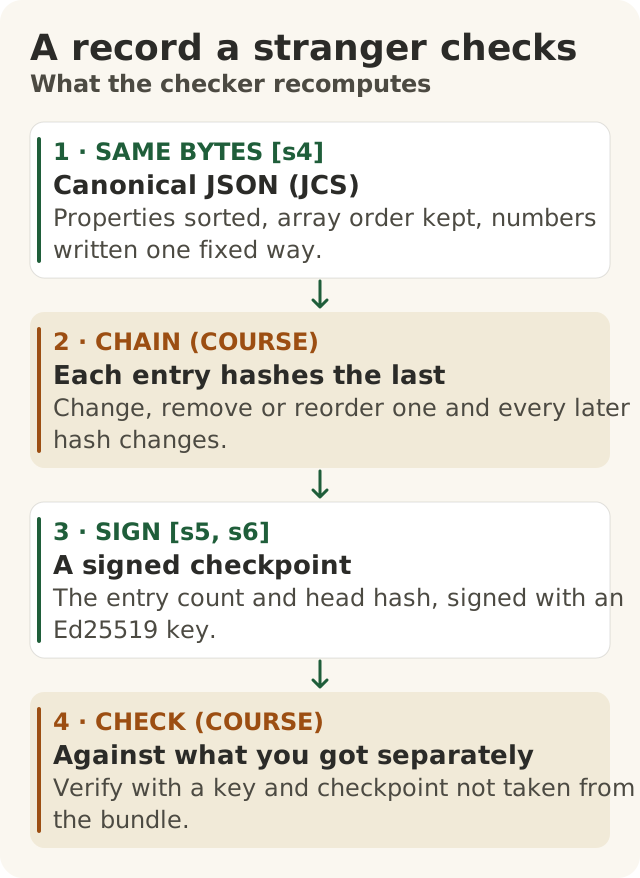
Figure data as text
Three parts of a checkable record
- SAME BYTES — canonical JSON (JCS): properties sorted, array order kept, numbers written one fixed way. [s4]
- CHAIN — each entry hashes the last: change, remove or reorder one and every later hash changes. (course)
- SIGN — a signed checkpoint: the entry count and head hash, signed with an Ed25519 key. [s5, s6]
- CHECK — against what you got separately: verify with a key and checkpoint not taken from the bundle. (course)
Objective: 400.8-b. Text equivalent of figures/three-parts-of-a-checkable-record.svg.
You cannot always stop someone from changing a record. But you can make changes easy to spot. Experts who study this say that stopping all tampering "might be impossible", but spotting it should be guaranteed.3 And spotting only works if someone actually looks. A record nobody checks catches nothing.3
Think of a notebook with three special features.
1. Every page is written the same way. A computer checks a record by its exact letters and spaces, not its meaning. "Price 5, Count 2" and "Count 2, Price 5" mean the same, but a computer sees two different records. So there is a fixed rule for writing each record: the same order, the same spacing, every time. There is a published standard for doing this.4
2. Every page carries a fingerprint of the page before. A computer can make a short "fingerprint" of any page. Change one letter and the fingerprint changes completely. Each new page copies the fingerprint of the page before it. Now, if anyone changes, removes or swaps an old page, every fingerprint after it stops matching. That is called a chain.
3. Every so often, the owner seals the notebook. The seal says: "So far there are 100 pages, and the last page's fingerprint is this." The seal is a signature, made with a secret key that only the owner has. Anyone with the matching public key can check the seal.5 Big systems that keep public logs, such as the logs used to keep web security certificates honest, do the same kind of thing.6
What the seal proves, and what it does not
Here is the catch. Suppose someone tears out the last ten pages, writes a new seal with their own key, and hands you the notebook. Every fingerprint still matches. The seal still checks out, against the key that came with the notebook. It all looks perfect.
So you need two things that do not come inside the notebook:
- The right key. You get a copy of the owner's public key some other way: from your own records, or a list the owner published. This is a pinned key.
- The right seal. You get the latest seal some other way too, such as an email the system sent you each night. The seal has two parts, and you check both: the page count and the last page's fingerprint. If it says 110 pages and the notebook has 100, ten are missing.
Why both parts? Because the count alone can be fooled. The owner, who has the real key, could write a whole new notebook of 110 pages and seal it. The count matches. The seal checks out. Only the last page's fingerprint is different. So you compare it with the fingerprint in the seal you got separately.
And the notebook must carry the owner's seal for exactly that page and fingerprint, made with the right key. Checking that the key looks right is not enough. An older seal for fewer pages is not enough either. No matching seal, no pass.
There is another trick. The owner could show one notebook to you and a different one to someone else. Experts warn about exactly this.3 6 Getting the seal through your own separate channel, and comparing with other checkers, is how you catch it.
With the pinned key and the expected seal (page count and last fingerprint), a check that passes proves:
- the pages have not changed since they were sealed;
- they were sealed by whoever holds the owner's secret key;
- no page up to the seal was removed, added or swapped.
It never proves:
- that what the pages say is true;
- whose key it is, if the key only came inside the notebook;
- that nothing happened after the last seal;
- that the decision written down was right;
- that the rules a page names were really followed, or that the approval it records really happened;
- anything that happened before the page was sealed.
That last one matters. Imagine Horizon had sealed every page the moment it was written. If a bug wrote the wrong number, or someone added a fake sale before the seal, the seal would lock in the wrong number. It would still check out perfectly.1 A seal shows nobody changed the page afterwards. It cannot show the page was right to begin with.
The same goes for the work you bring from Level 300. Your hold card and audit receipt come with a label saying where they came from. If you seal them now, your seal proves only that nobody changed them since you packed them.
The mistake this fixes: "A signed record proves what it says is true, and a chain that checks out is complete." A signature only shows who sealed which pages. A chain that checks out on its own only shows it agrees with itself.
At Big Widget Company
An auditor gets a bundle of 4,000 warranty decisions. Every check inside the bundle passes. She still asks: is this the right key? She compares it with the one the security team gave her when the key was made. And is this all of it? She checks the nightly email from the system: a page count and a last fingerprint. It says 4,112. So 112 decisions are missing, and the bundle alone would never have told her. She writes down that the check failed. She does not guess what the missing decisions said: the honest answer is "I don't know yet". She asks the team that keeps the log to explain the gap. (These numbers are made up.)
The box for the auditor
An evidence bundle is a box of files you give to an auditor who has never seen your system. They should be able to check it on their own, offline, without asking you anything. The Foundation's tool, Beacon, describes a bundle like this: a list of contents, the chained log of records, the public keys, the policy files, checklists, and a one-page instruction sheet called VERIFY.md.7 (Beacon is the Foundation's own tool, so its page describes what its makers say it does.)
What goes in the box:
- The chain of records and its seals.
- The public key, plus a note on where to get a trusted copy from outside the box.
- The rules (the policy file) and its fingerprint, so the auditor knows which version of the rules each record points to. (That shows which rules a record names. It does not show the rules were followed. That needs other proof.)
- A map of requirements, linking each rule the system must meet to the records that show it was met. Each entry says what it was checked against, and when.
- VERIFY.md: step-by-step instructions for checking everything.
- A list of known problems, written without anyone's personal details. Horizon shows why: the bug lists existed, but the people accused never saw them.1
- A sealed list of contents, made last. It lists every other file in the box with its fingerprint, and it is sealed with its own key. Then the auditor can tell if any file was added, removed or changed after you packed the box.
What never goes in the box:
- Prompts: what people typed into the AI.
- Outputs: what the AI wrote back.
- Personal data: names, addresses or details of customers, staff or dealers.
Prompts and outputs can contain private or secret information, and the box goes to a stranger. They add nothing the auditor can check anyway. Beacon's page says its records "never store prompts or outputs".7 This course's rule adds personal data to that list. So each record holds no private content. It holds fingerprints, the decision, the fingerprint of the rules, the job that approved, and the id of the key that sealed it. That is all.
Who approved? A record says which job approved a decision, such as "warranty operations lead". It never gives the person's name or staff number. Which person had that job that day stays in the company's own locked records. So the auditor can see that an approval was written down. They cannot see who it was, or prove the approval really happened. A sealed record shows its words have not changed. It does not show they are true.
The mistake this fixes: "More evidence is always better, so put in the prompts and outputs." The auditor needs the right evidence, not the most. In the Horizon cases, the best records were not used and the known problems were not shared.1
At Big Widget Company
The draft box for the warranty model holds the chain, the seals, the key and a note on where to check it, the policy file and its fingerprint, the map, VERIFY.md and the known-problems list. It also holds 300 examples of what the model was asked and what it answered, and a spreadsheet of flagged dealers with their names and phone numbers. The engineer takes those last two out, then makes a new list of contents and seals it again. The chain and its seals stay the same, because those two things were never in the chain. Everything else stays.
The three yeses for records
A gate can give four answers: go ahead, only this far, wait for a person, or no. Each record says which one it gave.
- Get to Yes: before a computer's answer is used against anyone, a gate decides. A computer flag on its own gets wait for a person, not no. What waits is the plan, not the person's normal life. Decide what other proof is needed, who can change the records, where the known problems are listed, and who is allowed to end the wait. A wait can't go on for ever: if the proof never comes, the plan does not go ahead. Set up the chain and the seals before the first decision.
- Stay at Yes: saying yes once is not the end. Seal the records on a schedule. Send each seal, separately, to someone who does not run the system. Make sure someone actually checks.3
- Recover to Yes: if a record is questioned, hand over the box and the known-problems list, and let the other side check it for themselves. If a check fails, say so, name who will fix it, and stop using those records until you know why. If you don't know why yet, say "I don't know yet", and say who is finding out. Stopping is not the same as fixing. You are back at yes only when a new box checks out and the cause is on the known-problems list.
Try it, and know which rules you are using
The course has a practice kit you can use offline: a made-up box of records, a checker, and a sheet standing in for the key and seal you would get separately. You don't have to run anything. A ready-made result, prepared/400P-b-verify-bundle.txt in the course's apps/sandbox400/ folder, shows what the checker found.
The kit asks the same questions as this lesson: right key? chain unbroken? a seal for the page count and last fingerprint you got separately? But it is built a little differently. It seals every page, not just the notebook. Its practice box starts counting at 0, so a seal that says "page 41" covers 42 pages. And it works out its fingerprints its own way, so they won't match ones made with this lesson's rules. Like this lesson, it fails a box with no seal, or with only an older seal. Use this lesson's rules for this lesson's examples, workbook and quiz. Use the kit's own VERIFY.md for the kit. When the kit says "ACCEPT", that is not a sign-off. Its keys are practice keys that anyone can use, so it shows how checking works, not who sealed the box.
Words to know: record, fingerprint (hash), chain, seal (signature), pinned key, evidence bundle, list of contents (manifest), VERIFY.md.