
Prompts that hold up · Plain gear
What you will learn
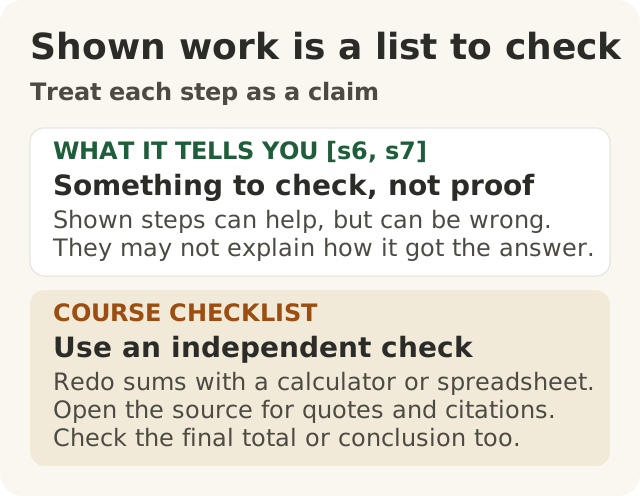
Figure data as text
Treat each step as a claim
| Part | What it means |
|---|---|
| WHAT IT TELLS YOU [s6, s7] | Something to check, not proof. Shown steps can help, but can be wrong. They may not explain how it got the answer. |
| COURSE CHECKLIST | Use an independent check. Redo sums with a calculator or spreadsheet. Open the source for quotes and citations. Check the final total or conclusion too. |
- How to write a prompt you can use again and again, for a job you do every week.
- How to ask the AI to show its steps, and why you still check every step yourself.
- How to test a prompt on easy and hard examples before you trust it.
In lesson 100.5 you learned to ask for one thing well. This lesson is about a prompt you will use a hundred times. Think of a recipe card in a busy kitchen. One good meal does not make a good recipe. A good recipe works on a busy night, with a new cook, when one ingredient has run out.
One rule from Level 100 stays the same. The AI writes a draft. A person checks it and decides.
A real case: writing down what the best people do
Some people think good prompting is a knack. You either have it or you don't, and you can't write it down. A real study is worth a look here.
Three researchers studied a large business-software company. Its support team answered customers' questions by online chat. The company gave the team an AI helper.1
- The helper read each chat and suggested what to reply. It also linked to the company's own help pages.1
- It learned from old chats. The chats by the company's best agents counted extra. The researchers say a lot of what makes a good agent is hard to put into words, like when to ask a question or how to calm someone down. Learning from the best agents' chats helped the AI pick some of that up.1
- The agents were the boss. They could use a suggestion, change it or ignore it.1
- On average, agents with the helper fixed 15% more chats each hour. Newer and less skilled agents gained the most. The most skilled agents gained little, and their chats got slightly worse.1
- When the helper had not seen enough chats about a topic, it said nothing, and the agent answered alone.1
That helper was a trained AI, not a written prompt. And it was one company.1 The study did not test a prompt at all. So here is what this course takes from it, as our own idea, not the study's finding. Some hard-to-explain skill could be learned from good examples. So it seems fair to think the easy-to-explain parts of a good request are worth writing down and sharing. Will your prompt help your team? You don't know yet. You find out by testing it, later in this lesson.
Notice one more thing. The helper stayed quiet when it did not know enough. A good prompt should tell the AI to do the same, and to pass the case to a person.
The six parts of a prompt you can reuse
A prompt template is like a form. Most of it stays the same. A few blanks get filled in each time, like this customer's email. This course uses six parts.
- The job. What to make, and who will check it. "Draft a reply. An agent will check it and decide whether to send it."
- The audience. Who will read it. "A customer who is not an engineer. Polite and short."
- The facts. Blanks for this case's facts, and the rule "use only these facts."
- An example. One good reply from before, made up or approved and with names removed.
- The format. Exactly how the answer should look, with a checklist at the end.
- When unsure. What to do if the facts don't answer the question. "Write NEEDS A PERSON and say what is missing."
Here is why the parts help.
- Examples help, usually. The researchers who built GPT-3 found that giving a few examples in the prompt usually helped, but not always.2 Anthropic, a company that makes AI, says in its own guide that examples should look like your real job and should include some odd cases too.3
- Labels keep things tidy. Anthropic suggests putting each part inside a labelled box, so its AI can tell the instructions from the parts that change.3 In our template, one box is called
<customer_email>. That name is ours, not Anthropic's. This is its advice for its own tool. The simple idea works anywhere: keep the fixed part apart from the blanks. - A fixed format makes checking quick. Anthropic says to be specific about the format you want.3 If every answer has the same checklist at the end, the hundredth answer is as quick to check as the first.
- "When unsure" gives it a way out. Anthropic says letting its AI admit it is unsure can cut down a lot on made-up answers.4 That is the company's claim about its own tool. The Foundation's Practice site says "I don't know yet" is always an answer, and it always pairs you with someone.5 So "NEEDS A PERSON" does both. It admits the gap, and it sends the case to a person.
- A rule is a request, not a lock. "Never promise a refund" makes a promise less likely. It does not make one impossible. Anthropic says its tips reduce mistakes but don't remove them all.4 So a person still reads every reply before it goes out.
At Big Widget Company (a made-up company), the warranty team's template asks for a reply and then a list called FOR THE AGENT. The list shows every date, amount and promise in the reply, and where each came from. The agent ticks each one against the claim record before sending, and reads the whole reply too.
Showing its working is not proof
Some jobs have several steps. Some people think that if the AI shows its working, the working is how it got the answer, and the answer must be right. Not so.
Steps can help. Researchers found that showing an AI a few worked examples, with every step written out, helped big AI models do better on maths, common-sense and symbol puzzles.6
Steps can be wrong. The same researchers say there is no guarantee the steps are right. They looked at 50 wrong answers. Some were almost right but had a simple sum done wrong.6 On most of their maths tests, using a real calculator for the sums helped.6
Steps may not be the real reason. Other researchers played a trick. In the examples they gave the AI, the right answer was always "A". The AI's answers were pulled off course, but its written explanations never mentioned the trick.7 Its working sounded sensible but did not tell the true story.7
So the working is like a list of claims. It is useful because you can check it. You still check it yourself.
What to do:
- Break the job into steps, and say what they are.
- Ask for working you can check without the AI: each number and where it came from, each quote word for word, each sum on its own line.
- Check each number in the source. Redo each sum on a calculator.
- Check the final answer too, not just the steps.
- If you can't check a number, say so. Mark it "not checked". Don't pass it on as a fact.
Don't ask the AI "are you sure?" as your check. A calculator and the source are your check.
A made-up example. Leila in finance asks an AI to estimate next year's warranty cost. She gives it three numbers: 1,240 widgets sold, 3.5 claims for every 100 widgets, and $820 for each repair. It shows its steps. Step 2 says there will be 434 claims. Leila checks on a calculator: it is about 43, not 434. The final total looked believable, but it was ten times too big. The neat steps did not make it right. Checking each step did. Leila, not the AI, decides what goes in the budget.
Working once is not working
Some people think that if a prompt worked once, it works. One good try on one easy case tells you very little. When someone says "it works", ask: out of how many tries?
- Tiny changes can matter. Researchers changed only small details of how prompts were laid out, without changing what they meant. For one AI model, the score moved by up to 76 points out of 100.8
- Results differ from case to case. In the support study, the helper did a lot for some agents and little for others, and it said nothing on topics it knew little about.1
- The maker says to test. Anthropic says to decide what success looks like, and how you will test for it, before you start improving a prompt.9 It says to test on cases like your real work, and not to forget the odd ones, such as an angry customer, typos, or a text that covers several topics.10
A small test, the course's way:
- Write down what a good answer must do, and must never do.
- Collect six to ten examples. Include an easy one and some hard ones: a complaint, a question the facts can't answer, a long, messy email, and a request for something you must never promise.
- Use made-up examples, or real ones only if your workplace has approved them and names and details have been removed. Never test with live customer or company records. (Lessons 100.7 and 200.5 cover this.)
- Write down the right result for each one before you run it. Sometimes the right result is NEEDS A PERSON.
- Run each one and mark it pass or fail. Run the hard ones more than once. Write the score as a count, like "7 out of 8".
- Fix the prompt, then run them all again. Run them again whenever the prompt or the tool changes.
A prompt that has only been tried on thank-you notes has not been tested. Try the one that could make it fail. And if all of them pass, that means it has not failed yet on those examples. It does not mean it never will.
The three yeses, for a prompt
The Foundation uses three short phrases: Get to Yes, Stay at Yes and Recover to Yes.11 Its gate gives one of four answers: go ahead, only this far, wait for a person, or no.11
- Get to Yes: test the prompt first. Then a named person says go ahead. Not the AI. Until the test is done, the answer is "wait for a person".
- Stay at Yes: keep checking every reply. Run the tests again after every change. One good week does not cover every week after it.
- Recover to Yes: if a bad reply gets out, stop using the prompt. Say who owns the fix. Put right what the customer was told. Add the case that failed to your tests, fix the prompt and test again. An untested fix is only a plan.
Keep the evidence, not the secrets. Keep your test examples and scores in your team's own files, if your workplace allows it. The Foundation's receipt is different. It never carries "prompts, outputs, payloads, personal data".5 So the test emails and replies stay in your work files, not in a receipt.
At Big Widget Company (a made-up story)
Sam runs a team that answers dealers' emails. Sam decides when a prompt is ready for the team. Each agent decides if a reply gets sent.
- Bad AI. Sam writes "Write a friendly reply to this dealer email." It works on one thank-you note, so Sam shares it. Then an angry dealer writes in. The AI replies cheerfully and promises a refund nobody agreed to.
- Good AI. Sam takes the warranty team's six-part template and changes it for dealers. The audience part now says: "A dealer's service desk. They know our products. Short and exact." The blanks are for the dealer's email, and the example is a made-up reply to a dealer. When a reply needs a sum, the prompt asks for each number and where it came from, and the agent redoes the sum on a calculator. Before sharing, Sam makes up eight test emails, including two complaints and one asking for a refund, and writes down what a good reply would do. The first run fails both complaints: the replies promise a call-back date that is not in the record. Sam fixes the "when unsure" part and runs all eight again. All eight pass. Sam says go ahead, for dealer warranty emails only. The team still checks every reply before it goes out.
Remember
- A reusable prompt has six parts: the job, the audience, the facts, an example, the format, and what to do when unsure.234
- In a real study, an AI trained on the best agents' chats helped newer agents most.1 This course takes from it that the parts of good work you can describe are worth writing down. That is our idea, not the study's finding.
- Shown working is something to check, not proof. The steps can be wrong, and they may not be how the AI really got there.67 Check the sums on a calculator and the facts in the source.
- One good try proves little.8 Test on easy and hard examples, made up or approved and cleaned, and test again after every change.910
- The AI writes. A named person checks and decides. When the AI is unsure, it should hand the case to a person.
Words to know: prompt template (a prompt with blanks to fill in), example, working (the steps), edge case (an odd or hard example), test set (the examples you test with), gate (the point where a person says go ahead, only this far, wait, or no), not checked (the honest label for something nobody has checked yet).
Want to learn more? (optional)
These free university pages are extra reading. They are not where this lesson's facts come from.
- Harvard's AI Pedagogy Project: AI Guide: https://aipedagogy.org/guide/
- Carnegie Mellon University Libraries' Generative AI guide: https://guides.library.cmu.edu/generative-ai