
Grounding it in your documents · Plain gear
Reviewed and published, version 1.0.0. As of 18 Nov 2026. Not a credential.
You will be able to:
- say what changes when an AI answers from your documents, and what does not;
- ask the AI to show the exact words it used, and check them yourself;
- tell when the documents are the problem, say who should fix them, and know when to pass a wrong answer up to the people who run the tool.
Big Widget Company, and every Big Widget document in this lesson, is made up.
Giving the AI the right pages
Think of a friend helping with your homework. If they answer from memory, they might be right or wrong. If you hand them the right page of the textbook first, they have a much better chance.
That is grounding. You ask the AI to answer from documents you give it. There are two ways:
- You hand it the page. You attach a file, or paste in some text, and ask about it.
- A tool fetches the page. The tool searches a pile of documents, picks the bits that seem to fit your question, and gives them to the AI. Experts call this retrieval-augmented generation. "Retrieval" just means "fetching".
The scientists who named it in 2020 said it was still hard for an AI to show where its answers came from.1 In one small test, they gave their AI newer documents, and its answers changed to match. They did not have to rebuild the AI.1 That was a science test on Wikipedia, not on a company's papers.
So grounding helps in two ways. The AI can use your rules, not a guess. And when your rules change, the AI can use the new ones.
Handing it the page is not enough
Here is the wrong idea: "If I attach the document, the answer comes from the document." Not always.
The AI may skip parts of the page. In 2023, scientists gave AIs a question and a pile of 10, 20 or 30 documents. Only one held the answer. They moved that one around.2 The AIs did best when the answer was near the start or the end of the pile, and worse when it was in the middle.2 Sometimes, with a big pile, one AI did worse than with no documents at all.2 Those were the AIs of 2023. Newer ones were not tested. But the lesson lasts: having the page is not the same as reading it.
The AI may add things. NIST, a US government science agency, has a name for an AI saying false things in a confident voice: confabulation.3 NIST says this includes answers that wander away from what the AI was given.3 So the AI can quote the right rule and then add a bit that is not in it.
The page itself may be wrong. If the page is old, or two pages disagree, the AI can read them perfectly and still be wrong. More on that below.
At Big Widget Company: Lee and the returns rule. Lee works in dealer support. Lee gives the AI the returns rule. It says: "This policy covers all returns, including returns from dealers. Unused parts may be returned within 30 days of delivery with the original invoice. Custom-built widgets cannot be returned." A dealer wants to return an unused part after 40 days. Lee asks three times and gets three answers:
- "No. Unused parts must be returned within 30 days." This one is on the page.
- "No, but you can get store credit with a 15% fee." This one only sounds right. Store credit and the fee are not on the page.
- "Yes, if you have the invoice." This one is wrong. It kept one part of the rule and dropped the 30 days.
All three sound like the rule. Only one is. Here is how to tell.
Ask for the exact words
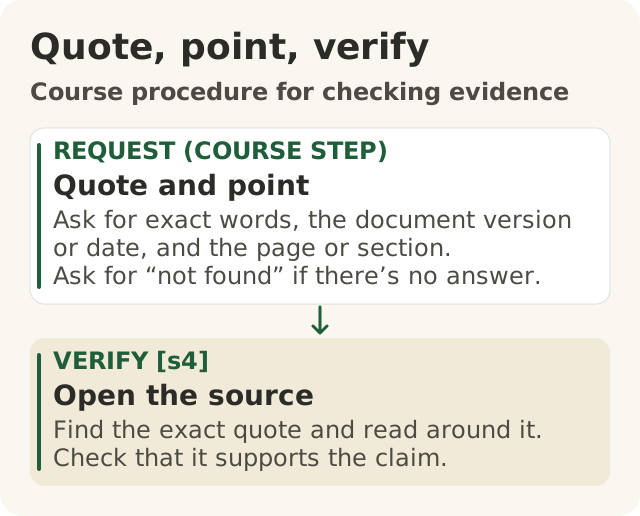
Figure data as text
Quote, point, verify
- Quote and point (course step) — ask for exact words, the document version or date, and the page or section. Ask for “not found” if there’s no answer.
- Open the source — find the exact quote and read around it. Check that it supports the claim. [s4]
Objective: 200.3-b. Text equivalent of figures/quote-point-verify.svg.
Ask the AI to show its work. Every time, ask it to:
- Quote the exact words from the document, in quotation marks.
- Say where they are: which document, which date, which section.
- Say "not found" if the document does not answer the question.
For example: "Answer only from the returns rule. For each thing you say, quote the sentence and give the section. If the rule does not say, write 'not in the rule'."
Asking does not make the AI right. It makes the AI easier to check.
Check the words yourself
Here is another wrong idea: "If the answer gives a source, the source must say it." Not so. NIST warns that an AI can make up reasons or sources that seem to back up its answer, and that these can fool people into trusting it too much.3 A source in an answer is just another thing to check. NIST says to check sources and citations in AI answers.3
Four steps:
- Open the real document. Not the AI's copy. The real, current one.
- Find the quote. Is it really there, word for word?
- Read around it. Does the next sentence add a "but" or an "except"?
- Match each claim to the quote. Does the quote really say what the answer claims?
Step 4 catches the sneaky ones. The AI might quote the 30-day sentence perfectly, then add the 15% fee. The quote is real. The fee is not in it. Cross the fee out, and do not pass it on.
Check every part of a long answer, not just the start. Remember: AIs can miss the middle.2
When the documents are the problem
The last wrong idea: "When the answer is wrong, it is always the AI's fault." Sometimes the documents are the problem:
- Two documents disagree. The AI can quote either one, and both quotes check out.
- A document is old. The AI reads last year's rule.
- A document is missing. Nothing answers the question. The AI should say "not found". If it answers anyway, it has filled the gap. Then there are two problems: the missing page, and an AI that did not say "not found".
NIST says good information can be traced back to where it came from, and makes clear when it might go out of date.3 So every document an AI reads should have a named owner and a date to check it again.
A true story: Air Canada's chatbot
In November 2022, someone in a customer's family died. The customer asked the chatbot on Air Canada's website about cheaper fares for people travelling after a death in the family.4 The chatbot said they could ask for the lower price after the trip, within 90 days of the day the ticket was issued.4 But the chatbot's answer linked to Air Canada's own page about these fares. That page said you could not ask after the trip.4 One website, two different answers.
The customer took Air Canada to a tribunal in British Columbia, Canada.4 Air Canada said it should not have to answer for its chatbot, as if the chatbot were on its own.4 In February 2024, the tribunal said no. The chatbot is part of Air Canada's website, and Air Canada is responsible for everything on its website.4 The tribunal said the customer did not have to double-check the chatbot against other pages.4 Air Canada had to pay.4 (The case is called Moffatt v. Air Canada, after the customer. We leave the name out of the story because the lesson does not need it.)
What it teaches: the company owns both answers, the page and the chatbot. So the company must make sure the things it publishes agree. That is not the customer's job.
What it does not tell us: the tribunal did not say how the chatbot came up with its answer.4 So we do not know if the documents or the AI went wrong. The honest answer is "unknown", and we do not guess. It is also just one small case, in one place.4
Who fixes it, and when to pass it up
When an answer is wrong, ask one question first: do the documents look right?
- If documents disagree, are old or are missing: tell the person who owns each document. They fix it. Do not pick one yourself and tell the customer.
- If a page is missing and the AI answered anyway: tell the page owner about the gap. Also pass it up to the people who run the tool. It should have said "not found".
- If the documents look right, but the answer is still wrong: this is not something you can fix by changing a page. Do not just ask again until you get a better answer. Pass it up to the people who run the tool. Send them the question, the answer, the quote and the real document. NIST says companies should keep a record of mistakes people report, and pass problems on quickly.3
An owner is a person with a name. If you do not know who it is, write "owner unknown" and ask your manager. Do not guess.
Working out exactly why the AI got it wrong is for Level 300. Your job is to spot it and send it to the right person.
At Big Widget Company: Lee, two weeks later. In this made-up company, Ana owns the returns rules. Tom runs the AI.
- The AI says dealers have 60 days to return a part. It quotes a "Dealer returns" page that really says 60 days. But the main rule says it covers all returns, dealers too, and gives 30. Lee reads around both quotes. Nothing says which page wins. Two pages give two rules for the same thing. Lee cannot tell which one is right, and it is not Lee's call. Lee tells the dealer the answer is being checked, and tells Ana about both pages.
- The AI says custom-built widgets can be returned. Lee checks. The rule is current and clear: they cannot. The documents are right; the answer is wrong. Lee does not use it, and sends it to Tom.
The three yeses
The Foundation names three moves: Get to Yes, Stay at Yes and Recover to Yes.5 A Foundation gate gives one of four answers: "go ahead · only this far · wait for a person · no".5 Here is how this course uses them for answers from your documents.
- Get to Yes: before you use the AI. Which documents does it read? Are they the newest? Who owns each one? Who runs the AI? If you do not know, write "not checked", and say who you will ask.
Stay at Yes: every answer. Check it with the four steps. Then pick one gate answer.
- Go ahead: every part checks out.
- Only this far: cross out the parts the quotes do not back up, like the 15% fee. Use the rest.
- Wait for a person: the pages disagree, are old or are missing, or the answer is wrong when the pages are right. Name the person. For Lee, that is Ana for pages, Tom for the AI.
- No: you cannot check the answer at all.
One good answer does not mean the next one is good.
- Recover to Yes: when a wrong answer got out. Say a dealer was told 60 days. Stop using that answer. Tell Ana. When Ana has picked the right rule and fixed the pages, tell the dealer. Then ask the AI again and check the new answer. Only then call it fixed.
Keep the evidence, not the secrets. Lee's note to Tom has the question, the answer, the quote and the real page. That note stays in Big Widget's own work files. A Foundation receipt is different. It "holds no private content".5 It never carries "prompts, outputs, payloads, personal data".6 So the dealer's details and the AI's answer do not go in a receipt.
My checklist
- I know which documents the answer used, and that they are the newest ones. If I don't know, I wrote "not checked".
- I found every quote in the real document.
- Every quote really says what the answer claims.
- If documents disagree, are old or are missing, I told their owner, by name.
- If the AI answered when it should have said "not found", or the documents are right and the answer is wrong, I sent it to the people who run the tool.
- My notes stay in the work files. Nothing private goes in a receipt.
Words to know: grounding, retrieval, confabulation, quote, source, owner, pass it up (escalate), gate, receipt, Get to Yes, Stay at Yes, Recover to Yes.
Want to learn more? (optional) The University of Washington's free lessons Modern-Day Oracles or Bullshit Machines?, by Carl T. Bergstrom and Jevin D. West, explain why an answer that sounds sure is not proof: <https://thebullshitmachines.com/>.