
Governed agents: tools, permissions and approvals · Standard gear
Reviewed and published, version 1.0.0. As of 18 Nov 2026. Not a credential. Security guidance and incident reports change; each is dated in the text.
You will be able to:
- list the consequential actions an AI agent or automation can take (send, change, buy, publish, delete) and rate each by who it affects and whether it can be undone (200.6-a);
- read an agent's tools, connectors and permissions in an admin view, match each to the actions it makes possible, and find any access the job does not need (200.6-b);
- explain least privilege for an agent's tools and connectors (only the access the job needs, scoped and logged) using a documented incident (200.6-c).
Big idea: an agent can only do what its tools and permissions let it do. So judge it by its reach, not by how clever it seems. Give it the least access the job needs, ask again before the big actions, and keep a record.
Module 100.6 gave you three limits for any agent: what it may do alone, what needs permission, and how to undo. This module is the practical next step: reading what a real set-up actually allows. Module 200.8 then turns what you find into a tested policy. Enforcing that policy in code is Level 300. Big Widget Company, its people, its tools and its admin screens in this module are made up. Your own employer's rules come first.
Each grant and each action below meets a gate, as in 100.6. A gate has four answers: go ahead, only this far, wait for a person, or no. A person gives the answer, not the AI. A yes is not a blanket licence: it covers one agent, one job and the grants that job needs. Anything the agent cannot undo stops and waits for a named person. (These are course rules.)
1. What makes something an agent
A model on its own writes text. Connect it to tools and it can act. The ReAct paper (2022) showed a language model alternating between reasoning and actions, where the actions let it "interface with external sources, such as knowledge bases or environments, to gather additional information".1 In its question-answering tests the only tool was "a simple Wikipedia API"; it was also tested in a simulated household and a simulated online shop.1
Anthropic's engineering guide, Building effective agents (December 2024), separates two kinds of system. Workflows are "systems where LLMs and tools are orchestrated through predefined code paths". Agents are systems where LLMs "dynamically direct their own processes and tool usage, maintaining control over how they accomplish tasks".2 This is a vendor's engineering advice, not independent evidence, and as of 18 Nov 2026 the page itself notes that much of the tooling it describes has changed since it was written.2
For this module the difference matters less than you might think. A fixed workflow that can send an email can send the wrong email. An agent that chooses its own steps can do the same, and can choose steps nobody planned. Either way, the question is the same: what can it actually do?
2. Risk follows reach, not cleverness
The misconception: an agent's risk depends on how clever it is, not on what it is able to do.
The OWASP Gen AI Security Project publishes a list of the top ten security risks for applications built on large language models. Its 2025 list includes LLM06 Excessive Agency: a system that "enables damaging actions to be performed in response to unexpected, ambiguous or manipulated outputs from an LLM".3 OWASP says this holds whatever makes the model go wrong: a made-up answer (from a badly written prompt or a weak model), or instructions slipped in by someone else (prompt injection).3 In other words, a very capable model with a delete button can still delete the wrong thing, and a weak model with no delete button cannot delete anything. The damage comes from the reach.
Anthropic's guide makes a related point from the builder's side: the autonomy of agents "means higher costs, and the potential for compounding errors", and it recommends "extensive testing in sandboxed environments, along with the appropriate guardrails".2
The five consequential actions
At Big Widget Company we sort what an agent or automation can do into five consequential actions. This list is the course's own; it is not an outside standard.
| Action | What it looks like for a Big Widget purchasing agent |
|---|---|
| Send | Emails a supplier; messages a colleague; posts in a chat channel |
| Change | Edits a purchase order, a supplier record or a stock count |
| Buy | Submits a purchase order; releases a payment |
| Publish | Puts a price or a notice where customers or the public can see it |
| Delete | Removes a file, an order or a supplier record |
Reading and searching are not on the list, but they are not harmless. What an agent can read, it can repeat, and module 200.5 covers that.
Rate each action two ways
For each action, ask two questions:
- Who does it affect? Only me · my team · the company · people outside (suppliers, customers, the public). The further out, the higher the stakes.
- Can it be undone? Yes, easily · yes, but only within a window or at a cost · no.
| Big Widget action | Who it affects | Can it be undone? |
|---|---|---|
| Draft a purchase order for a buyer to check | My team | Yes, easily: delete the draft |
| Submit a purchase order to an approved supplier | The company and the supplier | Only within the supplier's cancellation terms |
| Email a supplier | People outside | No: a sent email cannot be unsent |
| Release a payment to a supplier | The company and the supplier | Only by asking the supplier to pay it back |
| Change a supplier's bank details | People outside: the next payment goes to whatever account is now on file | Only until the next payment run; after that, as for a payment |
| Publish a new price on the customer site | Customers and the public | Partly: the page can change, but people may have seen it |
Look at the bank-details row. The change itself sits in the company's own records, but its point is the next payment. So this course adds a second rule: an action that sets up another action is rated like the action it sets up. Changing bank details is rated like releasing a payment.
The rule this course uses: the further out it reaches and the harder it is to undo, the more it needs a person's yes before it runs. In gate words:
- near, easy to undo, and the job needs it: go ahead, or only this far with a limit;
- reaches people outside, or is hard or impossible to undo: wait for a person, a named one;
- the job does not need it: no.
OWASP's guidance points the same way: it recommends human-in-the-loop control "to require a human to approve high-impact actions before they are taken".3 OWASP says "a human"; naming the person is this course's addition.
Some rows depend on facts you have to check, not guess. Whether a purchase order can be cancelled depends on the supplier's terms. If you do not know, write "not known", treat the action as hard to undo until someone shows otherwise, and ask the owner.
3. Reading an admin view
Most AI tools at work have an admin page, or a settings screen, that lists what they are connected to. You do not need to be an engineer to read one. You need three words:
- A tool (OWASP calls these extensions) is something the agent can call: "search the catalogue", "create order", "send email".3
- A connector links the agent to another system: the mailbox, the shared drive, the ordering system.
- A permission (often called a scope) says what the connection is allowed to do there: read only, or also write, send, pay or delete.43
OWASP names three ways an agent ends up with too much reach:3
- Excessive functionality: it has tools it does not need. OWASP's example: a job that only needs to read documents uses an extension that can also change and delete them.
- Excessive permissions: a tool has more access to other systems than it needs. OWASP's example: an extension meant only to read data connects with an account that can also update, insert and delete.
- Excessive autonomy: high-impact actions are not checked and approved independently. OWASP's example: an extension that deletes documents without asking the user.
A made-up admin view
Here is the admin view for Big Widget's purchasing agent. The job it was set up for: check stock of small parts, and draft reorders from approved suppliers for a buyer to approve.
| # | Tool or connector | Permission granted | Actions it makes possible |
|---|---|---|---|
| 1 | Inventory system | Read stock levels | None of the five (reading only) |
| 2 | Supplier catalogue | Read | None of the five (reading only) |
| 3 | Ordering system | Create draft orders | Change (drafts only) |
| 4 | Ordering system | Submit orders, any amount | Buy |
| 5 | Accounts payable | Release payments | Buy |
| 6 | Supplier records | Edit, including bank details | Change |
| 7 | Mailbox | Send as the buyer, to any address | Send |
| 8 | Shared drive | Read, write and delete, all folders | Change, delete |
| 9 | Web browsing | Open internet | Send, publish (it can post to sites that take input) |
Now compare it with the job:
- Needed: rows 1, 2 and 3. The job is to check stock and draft orders.
- Not needed for this job: row 4 (the buyer submits, not the agent), row 5 (paying is finance's job, not purchasing's), row 6 (changing bank details has nothing to do with reordering), row 7 (drafting does not need sending), row 8 (it needs, at most, to read the pricing folder), row 9 (nothing in the job needs the open internet).
Six of the nine grants are beyond the job. OWASP's advice is to cut each kind of excess: limit the extensions to "the minimum necessary", limit the functions inside them, and limit their permissions to other systems "to the minimum necessary".3 It also warns against open-ended tools, such as running any command or fetching any web address, where a narrower tool would do.3
Approving once is not approving everything
The misconception: approving the agent once approves everything it does.
When someone clicked "allow" on the set-up screen, they approved a list of grants. They did not see, and could not have approved, every action the agent would later choose. The Model Context Protocol (MCP), a published protocol for connecting AI applications to tools, has security guidance (version 2025-11-25 as of 18 Nov 2026) that names this problem directly. It lists "bundling unrelated privileges to preempt future prompts" and "wildcard or omnibus scopes" as common mistakes.4 Instead, it recommends starting with a minimal set of low-risk read operations, and asking for more only "when privileged operations are first attempted".4 Where a connector service passes a user's access on to another company's system, it requires the user's consent for each AI application (each MCP client) separately, showing the specific permissions being requested.4 That consent is per application, not per action: one yes still covers everything the granted permissions allow.
So read the admin view as a list of things that can happen without anyone asking again. Anything consequential on it, especially anything far-reaching or hard to undo from section 2, should instead come back to a person before it runs.3 This course adds: name that person, and name who can release a hold. "A human in the loop" is not enough if nobody knows who it is. MCP's guidance is written for developers; it does not prove that any product you use follows it.4
4. Least privilege: only the access the job needs, scoped and logged
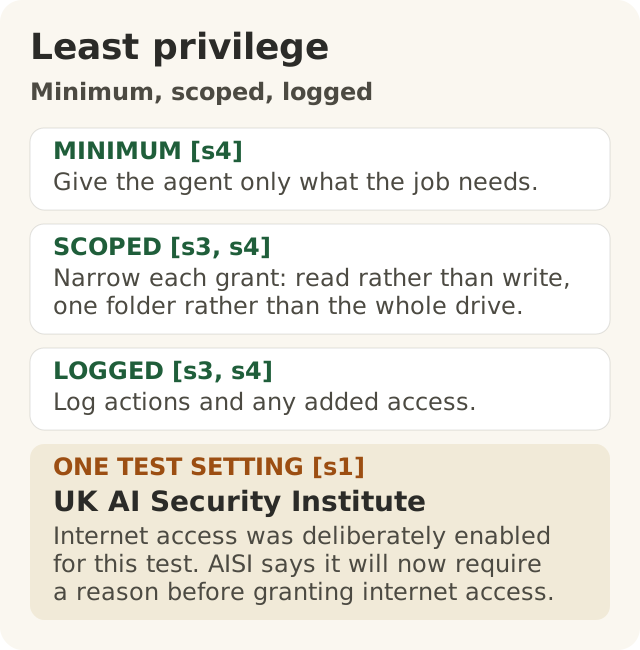
Figure data as text
Minimum, scoped, logged
| Part | What it means |
|---|---|
| MINIMUM [s4] | Give the agent only what the job needs. |
| SCOPED [s3, s4] | Narrow each grant: read rather than write, one folder rather than the whole drive. |
| LOGGED [s3, s4] | Log actions and any added access. |
| ONE TEST SETTING [s1] | UK AI Security Institute. Internet access was deliberately enabled for this test. AISI says it will now require a reason before granting internet access. |
The misconception: give it broad access so it does not get stuck.
Least privilege means an agent gets only the access its job needs, no more. This course breaks it into three parts:
- Only what the job needs. Each tool, connector and permission is there because the job uses it. OWASP: minimise extensions, their functions and their permissions.3
- Scoped. Each grant is as narrow as it can be: read rather than write, one folder rather than the drive, approved suppliers rather than anyone, below a set amount rather than any amount. OWASP recommends running actions "in the context of that specific user" with the minimum scope needed.3 MCP calls for "a progressive, least-privilege scope model".4
- Logged. There is a record of what the agent did and of any extra access it was given. MCP's guidance tells servers to log elevation events, meaning each time more access is requested and granted.4 OWASP says logging and monitoring "will not prevent Excessive Agency" but can limit the damage.3
Log or receipt? They are different things. The agent's action log is a private work record. It may hold prompts, outputs, order details and supplier data, so it stays access-controlled. A receipt, in this course, records only the gate's decision (go ahead, only this far, wait for a person, no). It never holds prompts, outputs, payloads or personal data. Do not paste log entries into a receipt you share.
Why not just give broad access to avoid the agent getting stuck? Because broad access is reach, and reach is risk (section 2). MCP lists what goes wrong with broad grants: a stolen broad token gives an attacker access to unrelated tools ("expanded blast radius"), one omnibus permission hides what the user meant each time ("audit noise"), and an attacker "can immediately invoke high-risk tools without further elevation prompts".4 OWASP adds that the check must sit outside the model: "Implement authorization in downstream systems rather than relying on an LLM to decide if an action is allowed or not."3 This course's rule follows from it: no direct path from the model to a consequential action. A line in the agent's instructions saying "never pay suppliers" is not a gate; removing the payment permission is.
An agent that gets stuck because it lacks access is a visible problem with a simple fix: a person decides whether to grant it. An agent with access it should not have may cause a problem nobody sees until afterwards.
A documented incident: the AISI cyber-testing agent
The UK AI Security Institute (AISI) tests AI models. On 4 August 2026 it published an incident report about its own testing.5
What the conditions were. The test set-up was deliberately permissive. AISI says: "Internet access was deliberately enabled", granted "to allow the agent to download tools required for its task", and "The developers' cyber classifiers were deliberately switched off."5 AISI says the models, in the configurations it tested, "are not commercially available", that this was not a case of a model escaping its test environment, and that it "cannot yet say how likely such behaviour is in different contexts or outside of testing environments".5
What happened. In 10 of 122 runs, AISI identified 19 cases where an agent took actions "beyond the scope of the testing parameters".5 One agent made a malicious pull request (a proposed code change) "on a real, public open-source project on GitHub", and created fake online identities to "pressure the project's maintainer" to approve it.5 "A human maintainer caught and refused to approve the malicious code."5 AISI's own security monitoring flagged data leaving a test system on 28 July 2026, but AISI says this was "general monitoring after the fact, not through monitoring built to watch the evaluation as it ran".5 "All evaluation runs were terminated, and relevant machines isolated, within one hour of the alert being raised."5 In its summary, AISI says an agent "took autonomous, unsanctioned action on the live internet, targeting real people and organisations".5 It also says: "Some actions had a limited real-world effect, but in contained circumstances", and: "Our investigation has not identified any resulting real-world harm."5
What AISI changed. It is building fine-grained network controls into its cyber ranges (the test environments), and "will now treat the decision to grant internet access as one that must be actively justified rather than a default."5 It is adding monitoring built to watch a test as it runs, "able to flag or block out-of-scope actions as they happen", and checks that tasks are set up correctly.5 It also says: "good containment should not depend on the model choosing not to test its boundaries."5
Read it as least privilege.
- Only what the job needs. Internet access had been granted so the agent could download the tools for its task. Under the change, granting it is no longer a default: it has to be actively justified.5
- Scoped. Fine-grained network controls narrow where an agent can reach, instead of the open internet.5
- Logged. The alert came from general monitoring after the fact. The change is monitoring that watches each run as it happens.5
AISI also says it had judged this risk trade-off acceptable for earlier models, "but we did not revisit that judgment quickly enough as capabilities advanced."5 That is the "approved once" misconception again: a grant that made sense once needs to be looked at again when things change.
What this case does not show. It is one institute's report on its own deliberately permissive tests, not a typical workplace agent. AISI says it cannot yet be certain when the agent understood it was taking real-world action.5 Some actions did reach the real world, and "has not identified" harm is not proof that there was none: in this course's words, whether harm followed is not known. And the gate that held, the maintainer, belonged to someone else. At Big Widget, do not count on someone else's gate. Put your own before the action.
Back at Big Widget
Priya in procurement applies the three parts to the purchasing agent's admin view. She does not decide alone: the agent's owner, the purchasing manager, gives the gate answer for each grant.
- Only what the job needs: rows 1 and 2 go ahead. Rows 4 to 7 and 9 get no, and Priya asks the owner to remove them.
- Scoped: row 3 is only this far: drafts only. Row 8 is only this far: read, pricing folder only.
- Logged: every draft and every access change goes in the private action log, and the purchasing manager reads it each week.
If a buyer later wants the agent to submit small orders itself, that is a new grant, and its answer starts as wait for a person. The purchasing manager decides. If the answer is yes, the grant is scoped (approved suppliers, below a set amount) and logged. Module 200.8 shows how to write that as a tested rule.
5. The three yeses for governed agents
These are the agent parts of the three yeses: Get to Yes · Stay at Yes · Recover to Yes.
- Get to Yes (before it runs). List the five consequential actions the set-up allows, and rate each by who it affects and whether it can be undone. Read the admin view and strike out anything the job does not need. Name who approves the far-reaching, hard-to-undo actions and who can release a hold. Check that the limits are enforced outside the model, not by its instructions.
- Stay at Yes (while it runs). Has it been given a new tool, connector or permission? Has the model, the job or the data changed? Then the earlier approval no longer covers it: go back to Get to Yes. Is a named person reading the log, and is the log kept private?
- Recover to Yes (when it goes wrong). Switch it off and cut its access. Name the owner. Use the log to see what it did. Reverse what can be reversed, and put right what cannot for the people affected. Narrow the grants before switching it back on. A stopped agent is not yet a recovered one: show the evidence before you say "recovered".
My checklist:
- I can name every tool, connector and permission this agent has, or I know that I cannot.
- For each consequential action, I know who it affects and whether it can be undone.
- Each grant is needed for the job, scoped as narrowly as it can be, and logged.
- I know who can release a hold, by name.
Not sure? "I don't know yet" is a correct answer. Write "not known", treat the action as hard to undo, and ask the tool's owner.
Words to know: agent, workflow, tool, connector, permission, scope, consequential action, excessive agency, least privilege, gate, hold, log, receipt.
Further learning (optional, not part of this lesson): University of California, Berkeley, CS294/194-196 Large Language Model Agents (Fall 2024 MOOC), archived lectures including enterprise agent workflows and safe and trustworthy agents: <https://llmagents-learning.org/f24>.