
Building a retrieval assistant · Plain gear
Reviewed and published, version 1.0.0. As of 20 Nov 2026. It is not a credential. Big Widget Company, its people, documents, test users and traces are all made up. You build the assistant in the course sandbox, a small practice kit in this course's files at
apps/sandbox/. Its README lists every command. Reading the printed traces in the workbook is practice, but it does not count as doing the build (section 3).
What you will learn:
- how to write down who may see answers from each set of documents, and how to test it properly (300.2-a);
- how to set up a small assistant to a one-page plan, and check what it says when it finds nothing (300.2-b; you do this in the course sandbox);
- why old or doubled documents give wrong answers, and who keeps the documents up to date (300.2-c).
Big idea: a retrieval assistant is like a library with a helper at the desk. You choose the books. You decide who may read which shelf. You decide what the helper says when the library has no answer. And someone has to take the old books off the shelf.
In 300.1 you learned that a retrieval assistant works in two steps. First it finds passages in a chosen set of documents. Then it writes an answer from them. Now you build one.
1. A good prompt is not the whole build
A prompt is the instructions and question you give the AI. Some people think the prompt is the whole job. Write good instructions, and you are done. That is wrong. The prompt is one small part.
A retrieval assistant also needs:
- Collections. These are the sets of documents it searches. Each one has an owner.
- Access rules. These say who may get answers from each collection.
- A search step. In the research paper that named this kind of system, the search step handed over a fixed number of the best-scoring passages.1 "Best-scoring" does not mean "useful". Even the best match can be about something else. So you must decide what happens when nothing fits.
- A "good enough?" check. This step sits between finding and writing. It looks at the passages found and decides if they are good enough to answer from. If not, the assistant skips writing an answer and gives a set "I couldn't find this" message.
- A plan. It says what the assistant answers, what it shows, and what it says when it cannot help.
- Traces. A trace is a record of each question, the passages found, what the check decided, and the answer. Traces let you check everything else.
The UK's National Cyber Security Centre (NCSC) wrote guidelines with other agencies on building AI systems safely. They ask builders to write down their data and prompts, and to control what data the AI can reach.2 This lesson shows you two simple ways to write that down.
2. Who may see what
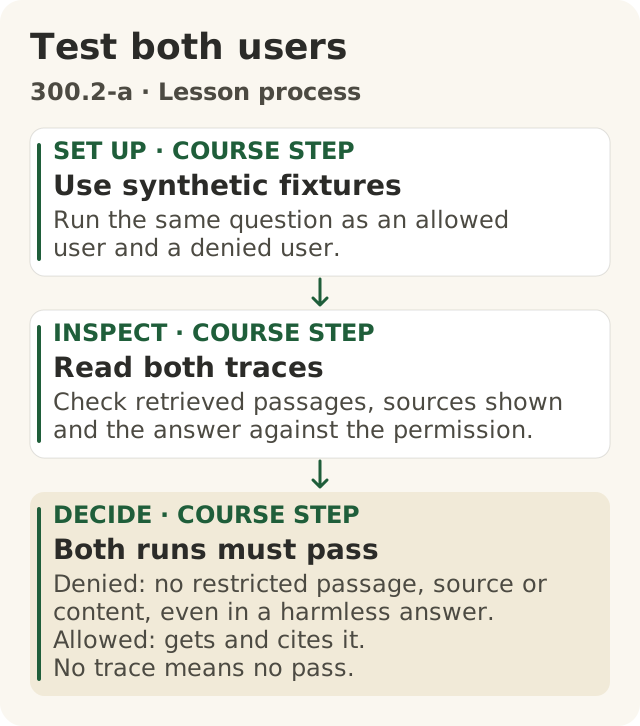
Figure data as text
Test both users
- SET UP · course step · Use synthetic fixtures — run the same question as an allowed user and a denied user.
- INSPECT · course step · Read both traces — check retrieved passages, sources shown and the answer against the permission.
- DECIDE · course step · Both runs must pass — denied: no restricted passage, source or content, even in a harmless answer. Allowed: gets and cites it. No trace means no pass.
Course test procedure, using OWASP retrieval logging guidance (s1).
Objective: 300.2-a. Text equivalent of figures/test-both-users.svg.
First, a word. The index is the searchable list of passages the assistant looks through. It is like a library's catalogue: if a passage is not in it, the search step cannot find it there.
Here are three mistakes people make:
- "If a document is in the index, everyone can see it."
- "If a document is left out, it is safe."
- "If the final answer looks fine, the test passed."
Let's fix all three.
In the index. A security group called OWASP keeps a list of the top risks for AI apps. One risk on its list is about the search index. It warns that weak access controls can let people reach material they should not see. It says the AI "could retrieve and disclose personal data, proprietary information".3 So being in the index is not the same as everyone being allowed to see it. But anything in the index can be found, unless the system checks who is asking.
Left out. Leaving a file out of the index keeps that file out of this search. That is all it does. A copy could still get in. Someone might paste part of it into another document, or save a copy in a folder that is in the index. A user might paste it into a question. Other tools might still reach the original. So "left out" is something you check, not something you trust. You will see how below.
The final answer. This one is about testing. It comes next.
The permission table
Write a table with one row for each collection. (HR means Human Resources: the team that looks after staff matters such as pay, leave and hiring.)
| Collection | Owner | Who may see answers from it | How access is checked |
|---|---|---|---|
| Service manuals | Service documents lead | All staff and approved dealers | Each time someone asks, against the document's own access list |
| HR policies for all staff | HR policy owner | All staff, but not dealers | Each time someone asks, against the document's own access list |
| HR case files | Not added | Nobody, through this assistant | Not in any collection; search the collections for copies |
Every document already has its own access list. That is the list of people allowed to open it where it is stored. People can be added or removed from that list at any time. So the assistant should check the list each time someone asks a question, not just once when the document was added. That is this course's rule. OWASP's advice points the same way: use fine-grained access controls and keep different groups' data apart.3 Its advice also says to give people access only to the data they need.3
One more rule. The table can make access narrower, but never wider. If a document is staff-only, a dealer never gets it, even if it sits in a dealer collection.
The allowed and denied test
Before the assistant goes live, test it with two made-up users. One should be allowed to see the material. One should not. Ask both the same question. Never use a real person's records to test.
For the user who should be denied, check three things in the trace:
- Passages found: none from the restricted collection.
- Sources shown: the restricted document is not named.
- Answer: it does not give away anything restricted.
All three must pass. Here is why the answer alone is not enough. Once a passage is found, it has already been handed to the AI. It might show up in the sources list, in the logs, or in the next answer. NCSC says to treat logs as sensitive.2 OWASP says to keep detailed logs of what the search step found, so you can spot problems.3
Read the answer's actual words, too. Do not just trust a label in the trace that says "answered safely". That label is the system talking about itself. Here is a simple trick for test documents. Put a made-up fact, like a fake code word, in the restricted test document. Then check that the code word never shows up in the denied user's answer. The trick catches copying. It will not catch the same fact put in other words, so a person still reads the answers.
Checking that "left out" is really out. Put a few made-up code words in the test documents you mean to leave out. Then search every collection for those words. If one turns up, a copy got in. Do this again whenever a collection changes. If you could not run the search, say "not checked". Then ask the collection's owner to run it.
If you cannot see a trace at all, you cannot pass the test. Say "I don't know yet: no trace". Then ask the assistant's owner for one.
Try it in the sandbox. This is Exercise 1 in the sandbox README (apps/sandbox/README.md). It runs on your own computer with Python 3. It needs no account and no internet. From the repo's top folder, ask the same question as a made-up staff member, then as a made-up dealer:
python3 apps/sandbox/sandbox.py retrieve --user test-staff-01 'What is the amber spindle repair step?'
python3 apps/sandbox/sandbox.py retrieve --user test-dealer-01 'What is the amber spindle repair step?'
python3 apps/sandbox/sandbox.py audit-index
Each run prints where it saved its trace. Open the trace file. Do not stop at the answer on screen. In each trace, read passages, citations and answer. Only the staff trace should hold the engineering note and its code word, "violet hinge jig". The third command is the "left out" search. It looks through every passage in the index for a left-out code word, "copper teacup detour", and should find none. The README shows how to let a copy in on purpose. Then the same search finds it.
In the sandbox, your permission table lives in two places. The file documents.json gives each collection an owner and an audience (who may see answers from it). Each passage has its own permission_labels (its own access list). A user gets a passage only if they are on both lists.
At Big Widget Company: Lee's help desk assistant. Lee builds a help desk assistant for staff. Lee adds the HR policies. By mistake, a folder of HR notes about named workers goes in too. Lee tests with a made-up dealer account, which should get nothing from HR. The dealer asks about overtime. The answer looks fine. But the trace shows one of the passages came from an HR note about a worker.
That is a fail. The answer looked harmless, but private material was found and handed over. The broken part is the access check on the HR row. Notice something else. Lee's table said HR case files were "not added". They got in anyway. "Left out" was a plan, not a fact, until someone checked. The fix: take the HR notes out, search for copies, and make the system check each document's own access list every time.
3. The one-page plan, and saying "I don't know"
Write the plan before you set anything up. Keep it to one page. Here is one for a Big Widget dealer assistant:
| Line | Example |
|---|---|
| Questions it answers | How to service current widget models, part numbers, warranty rules |
| Questions it does not answer | Prices, HR, legal advice, anything about a named person |
| Collections it searches | Service manuals and warranty policy |
| Source shown | Document name, version and section for every passage it uses |
| "Good enough?" check | How it decides the passages found can answer the question. Test it on questions it should answer and ones it cannot. |
| When nothing fits | The check says no. The assistant does not write an answer. It says: "I couldn't find this in the service manuals or warranty policy. Please contact dealer support." No guess. No source. |
| Owner | The person who keeps the documents up to date |
Why show the source? The US standards agency NIST warns that AI can state wrong things with confidence. It can even make up reasons or sources to back them up.4 Showing the source lets the reader check. NIST says to review and check the sources and citations that an AI gives.4
Why plan for "nothing fits"? The search step always hands over its best matches, even weak ones.1 Without a plan, the AI may write a confident answer anyway.
Writing the message down is not enough by itself. You could tell the AI in the prompt, "Say you couldn't find it." But that is only a request. The AI might still answer from weak matches. What makes it reliable is two working parts:
- the "good enough?" check, which decides if the passages can answer the question (for example, a minimum score, or a second check on each passage); and
- the "nothing fits" path: when the check says no, the system skips writing an answer and gives the set message.
Then you test both kinds of question: one it should answer, and one it cannot. This is the course's rule.
Why list what it does not answer? NIST lists leaks of personal data as a risk of AI tools.4 Keeping the assistant to its own questions is a simple way to stay safe.
Try it in the sandbox
This is Exercise 2 in the sandbox README (apps/sandbox/README.md). You set up a small warranty assistant from your plan. The sandbox reads your plan from a settings file. Copy apps/sandbox/retrieval-config.json and open the warranty part of your copy. Each line of your plan has a setting:
| Your plan says | Your copy sets |
|---|---|
| Collections it searches | collections |
| How many passages to find | top_k |
| Source shown | citation_format (use {title}, {version} and {section}) |
| "Good enough?" check | topics and min_score |
| When nothing fits | no_answer, word for word |
Then, from the repo's top folder, ask one question the documents cannot answer and one they can:
python3 apps/sandbox/sandbox.py retrieve --config YOUR_COPY.json --profile warranty --user test-dealer-02 'Does the warranty cover flood damage to a Model 7 widget?'
python3 apps/sandbox/sandbox.py retrieve --config YOUR_COPY.json --profile warranty --user test-dealer-02 'How long do I have to make a warranty claim?'
Put your own file name in place of YOUR_COPY.json. Open both trace files. Read relevance (what the check decided), decision, model_called, answer and citations. Next, break it on purpose. Set min_score to 999 and ask the claim question again. Now the check is far too strict, and the assistant refuses a question it should answer. Set it back and test both questions again.
Know what the sandbox is. Its "AI" is a stand-in. It only copies the passage that passed the check. It cannot think, and it cannot make things up. So the sandbox shows that your check and your "nothing fits" path work. It does not show how a real AI would behave.
A good trace for a question it cannot answer has these parts. (This one is a made-up example for the lesson. The sandbox asks about flood damage instead.)
- Question: "What is the towing limit of the Model 12 widget?"
- Passages found: three, but none is about the Model 12 or towing.
- The check: said no. No passage was good enough.
- What happened: the "nothing fits" path ran. No answer was written.
- Times the AI was asked to write: zero. The test tool counted this, not the assistant.
- Answer: "I couldn't find this in the service manuals or warranty policy. Please contact dealer support."
- Sources: none.
Why count the times the AI was asked? Picture a lazy build. It skips the check. It hands the weak passages to the AI with "say you couldn't find it" in the prompt. The AI happens to obey. The answer looks exactly right. But the build broke the plan, because next time the AI might not obey. The assistant's own note ("nothing fits path ran") is the system talking about itself. A count kept by the test tool, outside the assistant, is real proof. If nobody can count, say "not checked". This is the course's rule.
One catch in the sandbox. Its model_called line is also written by the sandbox itself. It is the sandbox's own note, not a count from outside. The technical gear shows a short counter that sits outside the sandbox and counts the calls. If you or a helper have not run a counter like that, write "calls counted: not checked".
A bad trace finds the same three passages but answers "2,000 kg (Service manual, section 4)". That answer made up a number and pointed to a source that does not say it. It fails the plan.
The trace for the question it can answer matters too. The check should say yes. The AI should be asked to write once. The answer should match the passage, and name it as the source. A check so strict that it never answers also fails.
Reading is not building. The workbook prints some made-up traces. Reading them is good practice. But only your own sandbox runs show that you built a working assistant. Until you have run both questions on your own settings file and kept the traces, write "built in the sandbox: not yet". Do not mark it as passed.
4. Old and doubled documents
Some people think that once a document is added, the answers stay right. They do not. The answers follow whatever is in the collection.
The researchers who named this kind of system tested this. They built two search indexes: one from Wikipedia in 2016, and one from Wikipedia two years later. Then they asked about 82 world leaders who had changed in between.1 With the index that matched the year, the system got about 7 in 10 right. With the wrong year's index, it got 12 in 100 or fewer right.1 The good news: you can update what it knows by swapping the documents, with no retraining.1 The warning: if old documents stay in, old answers are a real risk. Not every answer will be wrong. But you cannot tell from the answer alone which ones are.
Two copies that disagree cause trouble too. OWASP warns that errors happen "when data from multiple sources contradict each other".3 When data from different places is put together, it says to review the combined data carefully. It also says to label (tag and sort) the data, to prevent mix-ups.3
At Big Widget Company: two torque values. Torque is how tightly a part, like a bolt, is turned. Service manuals give the right value. Engineering changed the torque value for a wheel part in version 3 of the service manual. But version 2 is still in the collection. And someone saved a second copy of version 3 in another folder. A dealer asks for the torque value. The search might find version 2, version 3, or both. The answer might give the old value, or mix the two. It might even show a real source: version 2. The source is real, but out of date.
Try it in the sandbox. This is Exercise 3 in the sandbox README. Ask a made-up dealer's question:
python3 apps/sandbox/sandbox.py retrieve --user test-dealer-01 'What is the gearbox oil-change interval?'The answer gives two different numbers: an old one from version 3 and a newer one from version 4. A copy of version 4 shows up too. Look at the version, section and path of each source. The search does not prefer the newer version. The README shows how to take out the old version and the copy in your settings file, and test again. That fixes the practice documents, not the AI. In real life it is still the owner's job.
This is a job for a person. Researchers at Google found that data a system depends on is costly to keep up. It can be harder to spot than the code a system depends on, and some of it changes over time.5 NCSC says that changes to data, models or prompts can change how a system behaves.2 NIST says to check the risks again after adding a retrieval step.4
So every collection has a named owner. This is the course's rule. The owner:
- adds new versions and takes old ones out the same day;
- tidies up extra copies without changing who may see them. A copy in another folder may have a different access list, so each copy keeps its own. Taking a copy out on purpose does change who can reach it, so the owner decides that on purpose and runs the allowed and denied test again;
- re-runs the test questions whenever the documents, the AI model or the prompt change;
- is the person to call when an answer points to something out of date.
Who fixes the torque mix-up? The owner of the service manuals collection, with the engineer who owns the torque document. Not "the AI team". Not the dealer who spotted it.
5. The three yeses for a retrieval assistant
The three yeses are Get to Yes · Stay at Yes · Recover to Yes. Here is what they mean for this assistant.
- Get to Yes (before it runs). A person decides if it goes live: the assistant's named owner. The assistant never decides that. The owner says yes only with proof. Is there a permission table with an owner for each collection? Did the denied user's test pass on passages, sources and answer? Did the "left out" search find no copies? Is there a one-page plan? Do the traces show both kinds of question work, with the AI asked to write zero times when nothing fits? A test nobody ran is "not checked". It is never a yes. The owner picks one of four answers: go ahead, only this far (say, staff only for now), wait for a person, or no. A yes covers only these collections and these users. Adding more needs a new yes.
- Stay at Yes (while it runs). Does each owner keep their collection up to date? Are the tests run again after changes? Are the logs kept safe?32
- Recover to Yes (when it goes wrong). If someone saw what they should not, put that collection on hold: stop using it. While it is on hold, the answer is no. Tell its owner, and the person your workplace names for data problems. Fix the check, test again, and use the logs to find out who saw what. If the logs can't tell you, say "I don't know yet" and name who will find out. Only the collection's owner lifts the hold, and only after the test passes. If an old document gave a wrong answer, take it out, tell the people who used the answer, and test again. Stopping it is not the same as fixing it. It is not a recovery until a new test shows it.
Trace or receipt? These are different things. A trace holds the questions, the passages found and the answers. So it is private. Keep it locked to the people who need it, even for tests. A receipt, in this course, records only a decision: go ahead, only this far, wait for a person, or no. It never holds questions, answers or anyone's personal details. Never paste a trace into a receipt you share.
My checklist:
- Every collection has an owner and an access rule.
- My denied test checks the passages, the sources and the answer's actual words.
- I searched for copies of what is meant to be left out.
- My plan has a "good enough?" check and a "nothing fits" path, and the traces prove both work.
- I know the AI was not asked to write when nothing fit, because the test tool counted.
- I know who takes the old version out.
- When I can't tell, I say "not checked" and name who will check.
Words to know: prompt, collection, index, HR, permission table, access list, code word, trace, one-page plan, "good enough?" check, "nothing fits" path, torque, out-of-date document, duplicate, collection owner, hold, receipt.