
Why it works, and where it breaks · Plain gear
The big idea
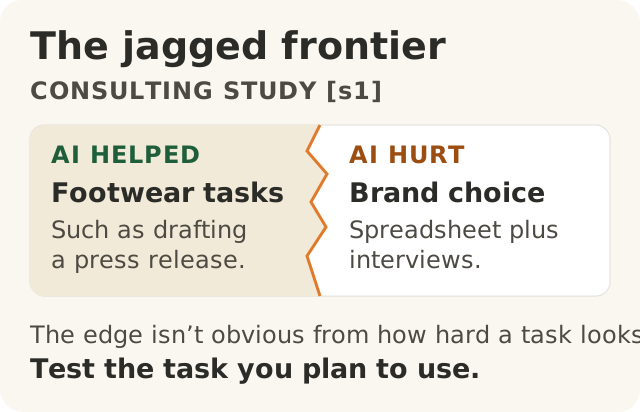
Figure data as text
The jagged frontier
Tasks in the consulting study (s1) | Which side? |
|---|---|
| Footwear tasks, such as drafting a press release | Inside the frontier: AI helped |
| Brand recommendation using a spreadsheet and interviews | Outside the frontier: AI hurt performance |
The sides do not share a numerical scale. How hard a task looks does not tell you which side it falls on. Test the task you plan to use (s1).
Some people say AI can do anything. Some people say it is useless. Both are wrong.
AI is very good at some jobs. It is bad at other jobs that look just as hard. And you cannot always tell which is which until you try it and check.1
This lesson tells the story of three real studies. In each one, researchers watched real people do real or realistic work, some with AI and some without. Then they counted what happened.
Story 1: the consultants and the shoe
Consultants are people that companies pay to solve business problems. Researchers worked with one big consulting firm. They split 758 of its consultants into two groups. One group did the shoe tasks below. The other group did the brand task. Nobody did both.1 In each group, some got to use an AI tool called GPT-4. Some did not. Who got AI was decided at random, like a coin toss.1
The shoe tasks. One set of tasks was about a new shoe. Think up ideas for it. Sort the customers into groups. Write a press release. Write a memo that gets staff excited.1
With AI, people finished more of these tasks. They worked faster. And their work was judged to be better.1 On jobs like these, AI was a big help.
The brand task. The other group got a different realistic task. People had to pick which of a company's brands could grow the most. They had a table of numbers and some notes from interviews. The numbers seemed to tell the whole story. But the right answer was hidden in the interview notes.1
Without AI, about 85 out of 100 people got it right. With AI, only about 60 to 71 out of 100 did.1 AI made people worse at this job.
The jagged edge
The researchers had a name for this. They called it the jagged frontier.1
Imagine a beach at high tide. The edge of the water is not a straight line. It goes in and out. You might stand on dry sand, take one step to the side, and be in the water.
AI's skills are like that. Two jobs can feel the same to you. One is on the dry sand, where AI helps. The other is in the water, where AI makes things worse.1
Here is the tricky part. When AI gets something wrong, it does not always sound wrong. A wrong answer can still sound believable.1 So how an answer sounds cannot tell you if it is right, and you cannot see the edge just by looking. You have to test the AI on your real work and check the answers.12
Story 2: the help desk
Another study looked at 5,179 people who answer customer questions. They got an AI helper to use while they worked.3
On average, they solved more problems each hour. New and less skilled workers got the biggest boost. The most experienced workers barely changed.3
Why? The researchers think, but have not proved, that the helper passed on the habits of the best workers to everyone else.3 If they are right, that would explain why new workers, who did not know those habits yet, gained the most.
Story 3: the experts who felt faster
In 2025, a research group called METR studied 16 skilled computer programmers. These programmers worked on big projects they knew very well. For each task, a coin toss decided: AI allowed, or no AI.4
Before they started, the programmers guessed AI would make them faster. Afterwards, they still felt faster. But when the researchers timed them, AI had made them slower.4
Their feelings pointed one way. The clock pointed the other.
One warning about this story. The AI tools in it are from early 2025. As of November 2026, METR says these results are out of date and no longer describe today's tools.4 We have not checked what today's tools do in that setting. So the honest answer is: we don't know yet.
So do not take away "AI slows experts down". Take away this: how it feels is not the same as what happened.
So what do I do?
These lists come from three studies, with the tools of their time. Treat them as a first guess to test, not a rule.
- Often good at: ideas, first drafts and writing, and helping newer staff answer customer questions. The studies found AI helped with these.13
- Often bad at: jobs where the right answer hangs on one small detail it might miss.1 Also, in one 2025 study with early-2025 tools, experts doing work they already knew well.4
- Test it on your real work. Do not assume one success means the next job will go well.1
- Measure, do not guess. Count the time, the mistakes and the redoes. A US government agency's guide to AI risk says to test AI in conditions like real use, before you start and again while you use it.2
- Ask about any number. Out of how many? Measured how? Compared with what? Over how long?
A rule you can say about yourself: I know how AI does on this task, because I tested it. Or I know that I have not tested it yet.
At Big Widget Company (a made-up example)
Big Widget Company and Sam are made up for this course. The studies are real.
Sam runs a customer service team. The team gets an AI helper.
- Good AI: New team members use it to answer customer questions. To see if it helps, Sam does not just compare before and after, because other things change too. For a few weeks, some team members use AI and some do not, on the same kinds of questions. Sam draws names from a hat to decide who uses it, so nobody picks their side. Sam counts how many problems each side solves in an hour. Someone checks the same number of answers from each side, without knowing which side wrote them, and counts how many out of those are right.
- Bad AI: A long-time team member uses it on a strange warranty fight. The answer hangs on one line in an old email. The AI misses it, but its answer sounds believable. The team member trusts it because it felt quick.
The Foundation has three yeses: Get to Yes before you start, Stay at Yes while it runs, and Recover to Yes when something goes wrong.5 Here is the measuring part of each:
- Get to Yes: Have we tested AI on real examples of this job, and checked the answers? Sam looks at the results and decides. The AI does not get to say yes to itself.
- Stay at Yes: Are we still counting what happens, instead of going by feel? A yes last month is not a yes forever.
- Recover to Yes: Say the wrong warranty answer reached the customer. Sam stops using AI on warranty fights. A person sends the customer a corrected answer. Sam changes the team's rule so warranty fights go to a person. Stopping is only the first step. It counts as fixed when the new rule is in place and checks show it works.
Testing is not the whole of getting to yes. A test can help Sam say "go ahead" for one kind of job. Sam also needs to know the customer's information is safe to share with the tool, and who checks and owns each answer. Modules 100.7 and 100.9 cover those.
One more rule. Sam keeps the customers' emails and the AI's answers in the team's own locked records. Those never go into a receipt. The Foundation's receipt holds no private content.5
Words to know: jagged frontier (the uneven edge of what AI does well), measure (count what really happened), novice (someone new), expert (someone with lots of experience), Get to Yes / Stay at Yes / Recover to Yes (say yes with care, keep checking, fix it when it goes wrong).