
Why it works, and where it breaks · Standard gear
What you will be able to do
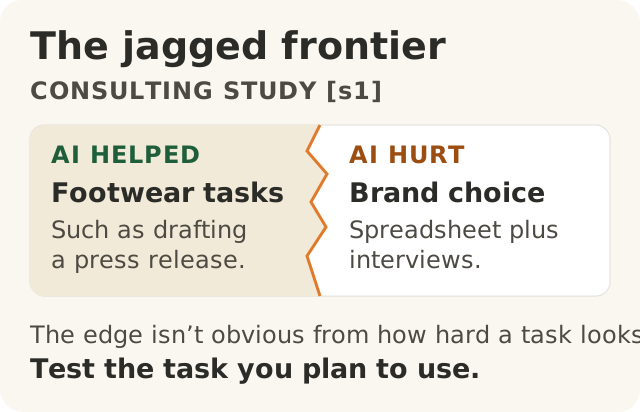
Figure data as text
The jagged frontier
Tasks in the consulting study (s1) | Which side? |
|---|---|
| Footwear tasks, such as drafting a press release | Inside the frontier: AI helped |
| Brand recommendation using a spreadsheet and interviews | Outside the frontier: AI hurt performance |
The sides do not share a numerical scale. How hard a task looks does not tell you which side it falls on. Test the task you plan to use (s1).
- Name kinds of work generative AI is usually good at and kinds it is usually bad at, with a work example of each.
- Explain the "jagged frontier" from a real study, and why you cannot see its edge without testing.
- Explain why you have to measure AI's effect on your own work instead of judging it by feel.
This lesson uses three studies. Each one measured real people doing real or realistic work, with and without AI. None of them is the last word. The tools have changed since.
What has not changed is the lesson they teach together. AI helps a lot with some work. It hurts with other work. You only find out which by checking. Trust a result because you checked it, not because someone said so, this lesson included.
Two wrong ideas
People tend to fall into one of two camps. Some think AI is good at everything. Others think it is useless. The studies below show that both are wrong. In one study at one firm, AI made some realistic consulting work better and other realistic consulting work worse.1
A note on "usually" in the headings below. It means: in these studies, with the tools and people they tested, at the time they tested them. Use these categories as a first guess about where to test, not as a rule about every job of that kind.
Where AI usually helps
Drafting, ideas, writing and first-pass analysis. Researchers worked with Boston Consulting Group on a randomized, preregistered experiment with 758 of the firm's consultants, split into two separate groups: 385 did a set of tasks inside the frontier and 373 did one task outside it.1 On 18 realistic consulting tasks, people using GPT-4 finished 12.2% more tasks and finished them 25.1% faster on average, and their work was of significantly higher quality.1 The tasks covered four kinds of work:1
- creativity ("Propose at least 10 ideas for a new shoe targeting an underserved market or sport."),
- analytical thinking ("Segment the footwear industry market based on users."),
- writing ("Draft a press release marketing copy for your product."), and
- persuasion ("Pen an inspirational memo to employees detailing why your product would outshine competitors.").
Customer-support chats, especially for newer staff. A study of 5,179 customer support agents found that an AI assistant raised the number of issues resolved per hour by 14% on average, and by 34% for novice and low-skilled workers.2
Why it works there
The support study offers a possible reason. It found suggestive evidence, not proof, that the AI assistant spread the best practices of the more able workers to everyone else, which helped newer workers move down the experience curve.2 The consulting study saw the same pattern: people who had scored in the bottom half on an earlier task gained the most from AI, though people in the top half also gained.1
If that suggestion is right, one way AI helps is by handing everyone a decent first draft of the way good work usually looks. That would be most useful to people who do not yet know what good work looks like.
Where AI usually hurts
Work where the right answer hangs on a detail the AI may miss. In the same consulting experiment, the researchers designed one more task to be outside what AI could do well. People had to recommend which brand had the most potential for growth, using a spreadsheet and a file of interviews with company insiders. The spreadsheet looked complete. But only a careful reading of the interviews gave the right answer.1 Without AI, about 84.5% of people got it right. With AI, 60% and 70.6% did in the two AI groups.1 AI made people worse.
An expert's own work, in one dated trial. In a 2025 trial, 16 experienced developers did 246 real tasks on large, mature software projects they knew well. Each task was randomly assigned to allow or ban early-2025 AI tools. With AI allowed, tasks took 19% longer.3 This is the narrowest finding here. It covers one setting and early-2025 tools, and METR now marks it out of date (see below).3 Experience alone does not put work outside the frontier: in the consulting study, the top-half performers also gained from AI on the shoe tasks.1
Experienced staff in the support study. The AI assistant had minimal impact on experienced and highly skilled agents.2 Even inside a success story, the gain was not spread evenly.
| Usually helps (in these studies) | Usually hurts or does little (in these studies) | |
|---|---|---|
| Kind of work | Ideas, drafts, writing, persuasion, first-pass analysis; customer-support conversations, most for newer staff | A correct answer that depends on a detail buried in the material; an expert's work on systems they know well (one trial, early-2025 tools, now marked out of date) |
| Work example from the studies | Product ideas and launch copy1; answering customer chats2 | Brand recommendation from data plus interview notes1; experienced developers on their own projects3 |
The jagged frontier
The consulting researchers called this pattern the jagged technological frontier. Inside the frontier, AI improves people's work. Outside it, AI's output is inaccurate, is less useful and can make people's work worse. Tasks that look about equally hard to a person can land on opposite sides of that line.1
Picture a coastline rather than a straight wall. You cannot tell where the water starts by how far you have walked. Two tasks can feel like neighbours, yet one is on dry land and the other is underwater.
That is why "it did one hard task well, so it will do this similar one well" is a trap. The brand task and the shoe tasks were both realistic consulting work, set for two separate groups of consultants from the same firm in the same study. One sat inside the frontier and one outside it.1 The paper does not say the two kinds of task were rated equally hard. Its point is that how hard a task looks is no guarantee of which side it falls on, so you have to test.1
Why you cannot see the edge without testing
The consulting paper points to two reasons the edge is hard to see:
- The models fail unpredictably. Large language models fail in some situations "in ways that are difficult to predict in advance".1
- Wrong answers can look believable. The same paper notes that these models can produce incorrect but plausible results that users find "believable".1
On the brand task, the researchers found that AI, given the instructions, the data and the interviews, reached the wrong conclusion. People who used AI also wrote recommendations that were more coherent and persuasive than those who did not, whether their answer was right or wrong. The only way to know an answer was wrong was to check it against the interviews.1 Not every wrong answer sounds right, but how well an answer reads is no evidence that it is right.
The US National Institute of Standards and Technology (NIST) makes the same point for organisations. Its AI Risk Management Framework warns that measuring risk in a laboratory or controlled environment may give different results from real-world use.4 It asks for AI to be measured "for conditions similar to deployment setting(s)", tested before deployment and tested regularly while in use.4
Feeling faster is not being faster
The developer trial is the clearest warning. Before they started, the developers forecast that AI would cut their task time by 24%. After the study, they still believed it had cut their time by 20%. Measured, it had made them 19% slower.3
They were experts, they were using the tools on their own projects, and they still got the direction wrong. If they could misjudge it, so can anyone.
Keep this study in its place. It tested early-2025 tools (mainly Cursor Pro with Claude 3.5 and 3.7 Sonnet).3 As of November 2026, METR, the group that ran it, labels these results out of date. It says they no longer reflect the current effect of AI on open-source developers, and it published new data on late-2025 tools in February 2026.3 The study also set out to describe one setting: experienced developers working on projects they know well. Its authors say AI tools may well be useful in other settings, such as for less experienced developers or in an unfamiliar codebase.3 This lesson has not checked what the February 2026 data show. Until someone does, the honest answer about today's tools in that setting is "not checked".
So the lesson is not "AI slows people down". The lesson is that feeling is not a measurement. The only way to know what AI does to your work is to measure it on your work. Before you repeat any number about AI, ask: out of how many? Measured how? Compared with what? Over how long?
At Big Widget Company (a made-up example)
Big Widget Company and the people in it are invented for this course. The studies above are real.
Sam runs a customer service team. The team adds an AI helper.
- Good AI. New agents use it on customer chats, like the support agents in the study.2 To measure the effect, Sam compares like with like: for a few weeks, some agents handle a kind of chat with the helper and some without, and Sam records issues resolved per hour and how often a checked answer was right on each side. Each study above compared work with and without AI.123 A simple before-and-after count is still useful for spotting change, but on its own it cannot show the helper caused it: the mix of questions, staffing and the season can change too. Who gets the helper matters as well. Sam settles it by a random draw of chats or agents, not by who volunteers, and the checker samples answers from both sides by the same rule without knowing which side wrote them. If a random draw is not possible, Sam matches the sides on experience and workload and treats the result as a strong hint, not proof.
- Bad AI. A veteran uses it on an unusual warranty dispute, where the answer hangs on a detail in the customer's emails. The AI gives a believable answer that misses the detail. The veteran trusts it because it felt faster. This is the brand task again, and the developer trial again.13
The three yeses: the measuring part
The Foundation names three moves: Get to Yes before something runs, Stay at Yes while it runs, and Recover to Yes after an incident.5 This lesson covers only the measuring part of each.
- Get to Yes. Is this kind of task inside the frontier? You only know if you have tried it on real examples of the job and checked the answers.14 The test result goes to a person. Here that is Sam, who owns the decision. The tool does not approve itself.
- Stay at Yes. Keep measuring the things that matter (time, errors, rework) instead of asking people how it feels.34 A yes given once is not a yes for good. Re-test when the tool, the task mix or the staff change.
- Recover to Yes. Say the veteran's wrong answer reached a customer. Sam stops AI use on warranty disputes. A person sends the customer a corrected answer. Sam changes the team's rule so disputes go to a person. Stopping is not recovering. The team can call it recovered only when the new rule is in place and checked answers show it works.
Testing alone does not give permission. A Foundation gate gives one of four answers: go ahead, only this far, wait for a person, or no.5 A good test result can support "go ahead" for one kind of task. It cannot answer the other questions. Is the customer data safe to share with the tool? Who checks and owns each answer? What may the AI do, and what must wait for a person? Modules 100.7 and 100.9 cover those.
Keep private things out of the receipt. Sam's pilot produces two kinds of record. The work notes hold customer emails, the AI's answers and the checker's marks. They stay in the team's controlled work records. A receipt of a gate decision is different. The Foundation's rule is that it holds no private content.5 So no customer emails, no prompts and no answers go into it.
Summary
- AI is neither good at everything nor useless. In the studies, it helped with ideas, drafting, writing and customer-support chats, and it hurt where the right answer depended on a buried detail.12
- The edge between "helps" and "hurts" is jagged. Tasks that look equally hard can fall on either side, and AI's mistakes can look believable, so you cannot see the edge without testing.1
- People can believe AI sped them up when it slowed them down. Measure the effect on your own work, in your own setting, and keep measuring.34
- A measured result informs a person's decision. It is not permission on its own. If you have not measured a task, say so. Not knowing yet is an honest answer, and the next step is to test.
Words to know: jagged frontier, inside and outside the frontier, measure, novice, expert, Get to Yes, Stay at Yes, Recover to Yes, receipt.