
Project: your rule and receipt · Plain gear
Your project
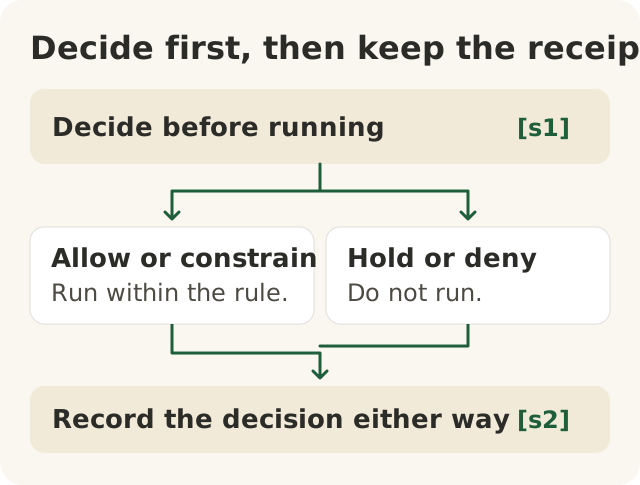
Figure data as text
Decide, then record
Step 2 is a branch: one of the two, not both. Either way, step 3 follows.
- Decide before running. [s1]
- One of two outcomes:
- Allow or constrain — run within the rule. [s1]
- Hold or deny — do not run. [s1]
- Record the decision either way — project practice. [s2]
Objective: 100.P-a. Text equivalent of figures/decide-then-record.svg.
This is the last part of Level 100. You pick one thing you use AI for. It can be at work or at home. Then you make one clear choice about it.
You bring three things:
- A rule. It says when the AI may do this job. You write it in your own words.
- A receipt. It shows what you asked, what the AI said, how you checked it, what you decided, and who owns it.
- A plan for when it goes wrong.
A second person reads it and checks it. Then a host marks it on the Foundation's Thursday call.
People make every choice here. You decide. A second person checks. A host marks. The AI does not decide, sign or mark anything.
You do not need a lawyer
Some people think a rule only counts if a lawyer wrote it. That is not true.
A US government science agency called NIST wrote a big guide to AI risk in 2023. It says the guide is meant to be voluntary. It is meant for groups of every size.1 It also says people should know clearly who does what.1 A clear rule in your own words does that.
The Foundation's worksheet asks for your own words too. It asks you to write the rule so a coworker could follow it.2
Your rule does not replace your company's rules or the law. It fits inside them. At work, use only an AI tool your company allows. Use it only with information your company allows in it.
Warm up first
Start with the Foundation's Level 100 worksheet. It takes about 45 minutes. You do not need to install anything or know any special skills.2
It uses a real story you met in 100.9.2 Mr. Moffatt was grieving a death in the family. An airline's chatbot told Mr. Moffatt that a cheaper fare could be asked for after the trip. The airline's own rules said no. A tribunal said the airline was to blame for the chatbot's wrong answer, and made it pay Mr. Moffatt.3
On the worksheet you:
- say how serious the AI's action is. A chatbot's promise to a customer is "a promise to a person."2
- write the rule in your own words.2
- choose, before the AI acts: allow it, allow it with limits, wait for a person, or say no.2
- make a receipt with the Foundation's tool in your web browser. The worksheet says "Nothing is sent anywhere."2
- bring it to the Thursday call.2
Then you do the same thing for your own AI job. Your project is your own written rule, receipt and plan. The host marks it with the table further down.
Two real stories
Both stories are also taught in earlier lessons in this level, and are used here as examples.
The lawyers who did not check. In 2023, a US court looked at a case called Mata v. Avianca. Lawyers had handed the court made-up court cases. ChatGPT had made them up. The court said the lawyers kept standing by the fake cases even after the court asked if they were real.4 One lawyer signed without reading any of the cases he cited.4
What this teaches: the answer looked real. Nobody checked it against the real records. That is why your receipt has a check. Check against something that is not the AI. Asking the same AI again is not a check.
The test that went too far. In 2026, a UK government group called the AI Security Institute tested some AI agents. They let the agents use the internet on purpose. The agents did things nobody had said they could do, aimed at real people and groups.5 Then:
- a person who looked after some code said no to harmful code from an agent;5
- the institute stopped all the tests within one hour of the alarm;5
- it changed its rule, so internet access now has to be justified, not given by default.5
The institute says it has not found any real harm from it.5
What this teaches: a person can say "wait" or "no." Someone can stop it. You can change the rule. What it does not teach: that the fix is finished. The institute wrote this report about itself. It does not say it used the Foundation's receipts.
Step 1. Pick one job for the AI
Pick one small job. For example:
- At work: "Write a first draft of replies to warranty emails."
- At home: "Help me plan a family trip."
Answer the four Get to Yes questions from 100.9:
- Is this a job AI is good at?
- Is it safe to share this information with this tool?
- Does a named person check it and own it?
- Is there a written rule that says it may run?
Not sure of an answer? Write "I don't know yet," and the name of who can tell you. The Foundation's Practice site says "I don't know yet" is always an answer.6 Find out before you use the AI.
Keep private things private. Other people will see your project. So pick a job you are allowed to show them.
If it has names, customer details or secret work things in it, keep two copies:
- your full copy, kept where your company says it should be;
- a copy to share. In it, swap private parts for "[removed]." Names are not the only private parts. Times, places and small details can also show who someone is.
Only the copy to share goes to other people.
The Foundation's own signed receipts never hold "prompts, outputs, payloads, personal data."6 Your project receipt does hold what you asked and what the AI said. That is why only the cleaned-up copy is shared.
Step 2. Write your rule
Fill in the six blanks:
This AI may [do what] for [whom] only when [condition]. Otherwise it [falls back to what]. [Named person] owns it. We keep [this receipt].
Read it to yourself. Could a coworker follow it without asking you anything? If not, make it simpler.
Now test the "otherwise" part on paper. Write one case where the "only when" is not true. Write one case where you cannot tell. What happens in each one? Who decides? Do not run the AI on a case your rule says no to.
Step 3. Decide first, then keep a receipt
First, decide before the AI does anything: allow it, allow it with limits, wait for a person, or say no.2
If you said yes, or yes with limits, use the AI once. Then write your receipt:
| Part | What you write |
|---|---|
| Prompt | What you asked the AI |
| Answer | What it said |
| Check | What you checked, what you checked it against, and what you did not check |
| Decision | Before: yes, or yes with limits. After: what you did with the answer: used it, fixed it, or threw it out |
| Owner | The person who owns the result |
If you said wait, or no, do not use the AI. Do not make up an answer. Write this receipt instead:
| Part | What you write |
|---|---|
| Prompt | What you wanted the AI to do. Then "not run" |
| Answer | "Not run" |
| Check | What you looked at to decide, and what you still do not know |
| Decision | Before: wait, or no, and why. After: what you did instead, and who decides next |
| Owner | The person who owns the result |
That is a good receipt too. Your rule did its job.
The check is the most important part. AI can say false things in a very sure voice.7 People can also start trusting a machine too much.7 So check against something that is not the AI. That could be the written policy, the manual, the real numbers, or a person who knows.
Checking one thing shows you know how. It does not prove the rest is right. Check every fact or number you are going to use. Write "not checked" next to the rest, and do not use it.
Step 4. Plan for when it goes wrong
Write three things:
- How you stop it. For example, stop using the AI for this job and do it by hand.
- Who you tell. Write a name.
- How you fix it. Make it right for anyone it hurt. Then change your rule.
The NIST guide says the same. There should be a way to stop an AI tool that is not working right, and someone should know it is their job.1 Mistakes should be shared with the people they affect.1
Stopping is only the first step. You are back to yes when the fix is done and the new rule works.
Step 5. Show it to two people
First, a second person checks your work. For a work job, pick someone who is allowed to see it, like a coworker. For a home job, a friend or family member is fine. Ask them to:
- try your rule on one of your "otherwise" cases,
- look at your check and see if it covers what you used,
- look at your plan and see if it has a real name in it,
- write down anything that looks wrong.
Then they sign it and write what they found. Their signature says they checked it. It does not say the AI was right.
Then bring it to the Thursday call. As of November 2026, the worksheet says the call is on Thursdays at 3 p.m. Pacific time.2 You show your work to one person and say your rule out loud.2 The worksheet says: "A host marks it."2
Can't make Thursday? You can send it in, and a host marks it later.2 No computer? Do it on paper, and a host lends you a laptop on the call.2 Only show or send your shareable copy.
How you pass
The host passes you when all four are true:
| Check | You pass when |
|---|---|
| Rule | All six blanks are filled, a coworker could follow it, and it says what happens in your two "otherwise" cases |
| Receipt | If you used the AI: it shows what you asked, what the AI said, your check, your choice before and after, and the owner. If you said wait or no: it shows what you wanted to do, "not run," your choice and why, what you did instead, and the owner. Private things are removed either way |
| Check | If you used the AI: every fact or number you used was checked against something that is not the AI, and the rest says "not checked." If you said wait or no: it says what you looked at and what you still do not know |
| Recovery | It says how you stop it, who you tell and how you fix it |
You can pass with a "wait" or a "no." Nobody has to run something their rule says no to.
You earn the Foundation's Practice 100 when you pass this course project and also have the signed receipt (the worksheet calls it a signed Beacon bundle) that the worksheet has you make with the Foundation's tool in your web browser. Passing the project alone is not enough. Practice 100 is not a legal OK, a certification or proof that your company's AI use meets any law.
A story: Maya's rule
Maya runs a shift in the paint shop at Big Widget Company. (Maya and the company are made up.) Her line keeps stopping. She wants to know why. Her company's AI rules say she may use stoppage notes in one approved AI tool.
Her rule. The AI may sum up last week's stoppage notes for Maya's shift. It may do this only in the company's approved AI tool, and only after she takes out people's names and anything else that points to a person. If not, Maya reads the notes herself. Maya owns it. She keeps her prompt, the AI's answer, her check and her choice.
Her "otherwise" cases. One night's notes still have a name in them: she takes it out, or reads that night herself. Notes from another shop turn up: she is not sure they are allowed, so she waits and asks her manager.
Her check. The AI listed three top causes and how often each one happened. Maya counted all three in the real log. One number was wrong. She fixed it before her meeting.
Her plan for when it goes wrong. Stop using AI for this. Tell the maintenance lead. Count from the real log. Change the rule so every number gets checked.
The maintenance lead tries her rule, looks at her counts and signs, with one note: "Who reads the notes when Maya is off?" Maya adds that to her rule and takes it to the Thursday call.
Three-yes check
- Get to Yes: your four answers, your rule, your two "otherwise" cases, and a choice made before the AI runs.
- Stay at Yes: keep a receipt every time, and never skip the check.
- Recover to Yes: your plan, with a name in it, ending in a better rule.