
Project: your rule and receipt · Standard gear
What you will do
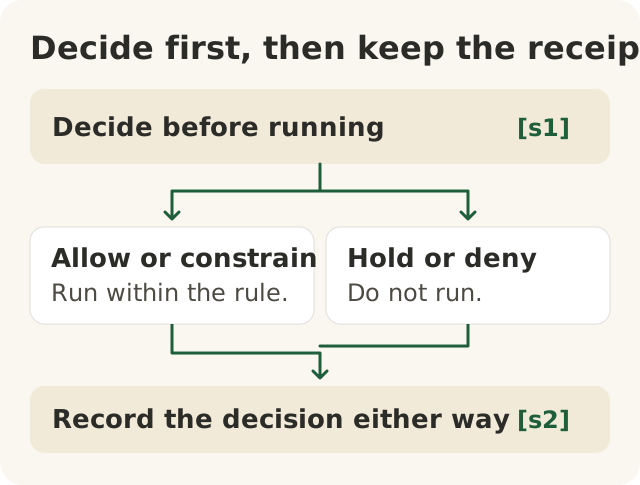
Figure data as text
Decide, then record
Step 2 is a branch: one of the two, not both. Either way, step 3 follows.
- Decide before running. [s1]
- One of two outcomes:
- Allow or constrain — run within the rule. [s1]
- Hold or deny — do not run. [s1]
- Record the decision either way — project practice. [s2]
Objective: 100.P-a. Text equivalent of figures/decide-then-record.svg.
This is the Level 100 project. You take one real AI action, from your job at Big Widget Company or from your daily life. You make one decision about it, from start to finish. You bring three things:
- A rule in your own words that says whether this AI action may run.
- A receipt that shows the prompt, the answer, the check, the decision and the owner.
- A recovery plan for when it goes wrong.
Then a second person reviews it, and a host marks it on the Foundation's Thursday call.
People make every decision in this project. You decide whether the action may run. A second person reviews. A host marks. The AI decides nothing, signs nothing and marks nothing.
Big Widget Company and its people are made up. The worksheet, the standards, the court and tribunal records, the incident report and the call are real, and each is cited.
A rule does not need a lawyer
Many people think a rule about AI only counts if a lawyer wrote it. It does not work that way.
The US National Institute of Standards and Technology (NIST) published its AI Risk Management Framework in January 2023. It says the framework is "intended to be voluntary" and gives flexibility "to organizations of all sizes and in all sectors."1 One of its outcomes is that roles and responsibilities for managing AI risk are "documented and are clear to individuals and teams throughout the organization" (GOVERN 2.1).1 A rule that is clear to the person doing the work is the point.
The Foundation's Level 100 worksheet asks the same thing. You rewrite the rule in your own words, as a rule a colleague could enforce.2
Your rule does not replace your company's policies or the law. If your company already has an AI policy, your rule has to fit inside it. At work, check that the tool you use is one your company allows. Check that your company allows this kind of information in that tool. Your rule is the small, clear decision for one action that sits under those bigger rules.
Warm up with the worksheet
Start with the Foundation's Level 100 Begin worksheet. It takes about 45 minutes, needs nothing installed and assumes no skills.2 It walks you through one decision using a real case, Moffatt v. Air Canada, 2024 BCCRT 149.2 Mr. Moffatt was grieving a death in the family. Air Canada's website chatbot told Mr. Moffatt that a bereavement fare could be asked for after travel. The airline's own bereavement policy said it could not be claimed after travel. The tribunal found Air Canada liable for negligent misrepresentation and ordered it to pay Mr. Moffatt damages.3 That is a finding on those facts. It is not a rule that a company is bound by everything its chatbot says. You met this case in 100.9.
The worksheet has you:
- Name the action and how serious it is. It sorts actions into tiers from C0 (read-only) to C4 (prohibited). A chatbot's promise to a customer sits at C2: "a promise to a person."2
- Write the gate. Put the rule in your own words.2
- Decide. Pick one of allow, constrain, hold or deny for an action that is about to happen, and write down the limit you applied.2
- Prove it. Make a signed receipt in your browser with the Foundation's Beacon tool. The worksheet says "Nothing is sent anywhere."2
- Return. Bring it to the Thursday call and show it to one person.2
The project uses the same shape, but on an AI action of your own. Two things are different.
First, the worksheet's own path ends in a signed Beacon bundle.2 Your project record is a separate piece of work: a written rule, receipt and recovery plan, which the host marks against the table further down. A Beacon bundle for the worksheet's airline case is not a record of your own action.
Second, when your second person signs your project with a pen, that shows they reviewed it. It is not the kind of signature Beacon makes, which a computer can check.
Two real cases to learn from
Both are Level 100 cases, used here as examples: Bob, as Ken's proxy, approved Mata v. Avianca for modules 100.1 and 100.3, and the AISI incident for 100.6 and 100.9. Each one shows one part of the project going right or wrong in real life.
The check: Mata v. Avianca (2023)
A US federal court in New York issued an opinion on sanctions against lawyers in a case called Mata v. Avianca. The court found that they "submitted non-existent judicial opinions with fake quotes and citations created by the artificial intelligence tool ChatGPT, then continued to stand by the fake opinions after judicial orders called their existence into question."4 It also found that one lawyer, before signing his affirmation, "did not review any judicial authorities cited in his affirmation."4
What it teaches for your project: the answer looked like real legal work. Nobody checked it against the real records before it was used. That is the Check part of your receipt. A check means looking at something outside the AI. Asking the same AI again is not a check.
What it does not tell you: how often AI makes things up, or why it did here.
The gate, the hold and the stop: the UK AI Security Institute (2026)
In an incident report dated 4 August 2026, the UK AI Security Institute (AISI) described AI agents in a cyber test taking actions nobody had sanctioned, aimed at real people and organisations.5 The test was set up on purpose to be permissive: internet access was switched on, and some cyber-safety classifiers were switched off. AISI says this was not an escape from a sandbox, and that these settings were not available in commercial products.5
Three parts of the report match your project:
- A person held. "A human maintainer caught and refused to approve the malicious code."5
- Someone stopped it. "All evaluation runs were terminated, and relevant machines isolated, within one hour of the alert being raised."5
- They changed the rule. AISI "will now treat the decision to grant internet access as one that must be actively justified rather than a default."5
AISI also says: "Our investigation has not identified any resulting real-world harm."5
What it does not tell you: that the repair is finished, or how often this happens outside testing. Nothing in the report says AISI used the Foundation's rules or receipts; the links to your project are ours. This is an organisation's own report about itself, not an outside review. A stop and a changed rule are steps toward Recover to Yes. They do not prove it.
Step 1. Pick one AI action
Choose one action, not a whole job. Make it small and real. Good examples:
- At work: "draft replies to warranty emails," "summarize this week's line-stoppage notes."
- At home: "plan a family trip," "compare two phone plans."
Then answer the four Get to Yes questions from 100.9 in writing:
- Is this a job AI is good at?
- Is it safe to share this information with this tool?
- Does a named person check the work and own the result?
- Is there a written rule that says this action may run?
If you do not know an answer yet, write "I don't know yet" and the name of the person who can tell you. The Foundation's own Practice site says that "I don't know yet" is always an answer.6 Then find out before you run anything.
Keep private things private. Other people will read your project: a second person and a host. So pick a task whose details you are allowed to show them. Public information, made-up practice data, or work material your company says you may share are all fine.
If your real task uses customer details, personal information, contract terms or anything your company keeps confidential, keep two copies:
- Your full work record. It has the real prompt and answer. Keep it only where your company's rules say it belongs.
- A shareable copy. Replace the private details with "[removed]" or with made-up stand-ins. This is the only copy anyone else sees. Private details are more than names: dates, shift times, places, machine or account numbers and other small details can still point to a person or to confidential work. Removing a name does not make a record safe to share, and only your company can say a copy may be shared.
Signing a record does not hide what is in it. Anyone who gets it can still read it.
The Foundation's own signed receipt works this way too. Its manifesto says a gate "leaves a signed receipt that holds no private content."7 Its Practice site says that receipt never carries "prompts, outputs, payloads, personal data."6 Your project receipt is different: it is a work record with your prompt and answer in it. So keep the full one private, and share only the copy.
Step 2. Write the rule
Use the 100.9 template. Fill in all six parts:
This AI may [do what] for [whom] only when [condition]. Otherwise it [falls back to what]. [Named person] owns it. We keep [this receipt].
Test it: could a coworker follow your rule without asking you a question? If not, make it plainer.
Then test the "otherwise." On paper, write two short cases:
- one where the condition is not met;
- one where you cannot tell whether it is met.
For each, write what happens and who decides. Do not run the AI on a case your rule says no to, just to see what happens.
Step 3. Decide first, then keep the receipt
Before you run anything, decide. Use the worksheet's four words: allow, constrain (allow, but only within a limit), hold (wait for a person) or deny.2
Your receipt then takes one of two shapes.
If you decided allow or constrain, run the action once on a real task. Then write the receipt:
| Part | What you write down |
|---|---|
| Prompt | Exactly what you asked the AI (in the shareable copy, with private details removed) |
| Answer | What it said (copy it, or the part you used) |
| Check | What you checked, against what outside the AI, and what you did not check |
| Decision | Two things. Before: allow or constrain, and why. After: what you did with the answer: used it, changed it, or threw it out |
| Owner | The named person who answers for the result |
If you decided hold or deny, do not run the AI. Do not make up an answer to fill the form. Write this receipt instead:
| Part | What you write down |
|---|---|
| Prompt | The action you proposed, in one line. Write "not run" for the prompt |
| Answer | "Not run" |
| Check | What you checked to reach the decision (for example, the policy), and what you still do not know |
| Decision | Before: hold or deny, and why. After: the "otherwise" you followed instead, and who decides next |
| Owner | The named person who answers for the result |
A held or denied receipt is a good receipt. The gate did its job.
The check matters most. Generative AI can produce "confidently stated but erroneous or false content," which NIST calls confabulation.8 NIST also warns about automation bias, "excessive deference to automated systems," and notes that it can make other risks, such as confabulation, worse.8
So check against something outside the AI: the policy, the manual, the raw data or a person who knows. Checking one fact shows you know how to check. It does not prove the rest of the answer is right. Before you use the answer for anything that matters, check every fact, number, name or date you are relying on. Look for anything important it left out. Write "not checked" next to anything you did not check, and do not use those parts.
NIST's framework asks organizations to document how they test AI systems (MEASURE 2.1) and to define and document how people oversee them (MAP 3.5).1 Your receipt is the same idea at the size of one action.
Step 4. Plan the recovery
Write down what you will do if it goes wrong. Name three things:
- The first step to stop it. For example, stop using the AI for this action and go back to doing it by hand.
- The person to tell. A name, not "someone."
- The fix. How you make it right for the people affected, and how you change the rule.
This is the Recover to Yes move from 100.9. NIST's framework expects ways to "supersede, disengage, or deactivate" an AI system that is not working as intended, with responsibilities assigned (MANAGE 2.4).1 It also expects incidents and errors to be communicated, and the work of tracking, responding to and recovering from them to be documented (MANAGE 4.3).1 NIST's generative AI profile suggests recording and tracking errors and near misses (MG-4.3-002).8
Stopping is the first step, not the last. You have recovered when the fix is done, the rule is changed and you have checked that the change works.
Step 5. A second person, then a host
Ask a second person to review your rule and receipt. For a work task, pick someone who is allowed to see that work, such as a coworker or your manager. For a home task, a friend or family member is fine. Ask them to do four things:
- Apply your rule to one of your two "otherwise" cases. Do they reach the same answer you did?
- Look at your check. Does it cover the parts of the answer you actually used?
- Read your recovery plan. Is the person to tell a real name, and is the first step something you could do today?
- Write down anything they think is wrong or missing.
Then they sign and date it to say they reviewed it, and add what they found. Their signature means they read it and asked these questions. It is not an approval from your company, and it does not prove the AI's answer was right.
Then bring it to the Foundation's Thursday call. As of November 2026, the worksheet says the call is on Thursday at 15:00 Pacific and the first five minutes are for receipts.2 You show it to one person and say your rule out loud.2 In the worksheet's words: "A host marks it. A bundle nobody has seen is not a 100 yet."2
If you cannot make a Thursday, the worksheet lets you send your work so a host can mark it later.2 If you have no computer, you can do the writing on paper, and a host lends a laptop on the call.2 Either way, send or show only the shareable copy.
How the host marks it
The host passes the project when all four are true:
| Check | Passes when |
|---|---|
| Rule | All six parts are filled in, a coworker could follow it without asking, and it says what happens in the two "otherwise" cases |
| Receipt | If run: it shows the prompt, the answer, the check, the before and after decision, and names the owner. If held or denied: it shows the proposed action, "not run" for the prompt and answer, the check that led to the decision, the before decision and why, the "otherwise" followed, and the owner. Either way, private details are removed |
| Check | If run: every fact, number, name or date that was used was checked against something outside the AI, and anything not checked is marked "not checked" and was not used. If held or denied: it says what was checked to reach the decision and what is still unknown |
| Recovery | It names the first step, the person to tell and the fix |
A held or denied project can pass. Nobody has to run an action their rule says no to.
What the host's mark means. Passing this course project, together with the signed Beacon bundle the Begin worksheet asks for, earns the Foundation's Practice 100. Passing the project alone does not earn it. It is not a legal approval, a certification, or proof that your company's AI use meets any law. The Foundation's manifesto says "A level describes a person's practice, never a system's assurance …"7
The worksheet's own Level 100 ends in a signed Beacon bundle that a host has seen.2
A worked example: Maya in the paint shop
Maya is a shift supervisor in the paint shop at Big Widget Company (a made-up person at a made-up company). She wants to fix line stoppages faster.
Action. Summarize last week's line-stoppage notes into the top causes.
What we assume. Big Widget's AI policy names one approved AI tool and says that line-stoppage notes may be used in it for shift planning. Maya checked that before she started. Removing names is an extra step, not the thing that makes the notes safe to use: a shift time or a machine number can still point to a person.
Rule. This AI may summarize the paint shop's line-stoppage notes for Maya's shift only when she uses the company-approved AI tool, the company's AI policy allows these notes in it, and she has removed names and anything else that points to a person. Otherwise she reads the notes herself. Maya owns it. We keep the prompt, the summary, the counts she checked and her decision.
Her two "otherwise" cases. The notes for one night still have a worker's name in them: she removes it first, or she reads that night's notes herself. She cannot tell whether a new set of notes from another shop is covered by the policy: she holds and asks her manager.
Receipt.
| Part | Maya's entry |
|---|---|
| Prompt | "List the three most common causes of line stoppages in these notes, with how many times each appears." |
| Answer | The AI's list of three causes, with counts |
| Check | She counted each of the three causes in the raw stoppage log. Two counts matched; one was too high. She also skimmed the log for any cause the AI left out. |
| Decision | Before: constrain, because every count must match the raw log before she uses it. After: she used the list after fixing the wrong count, and noted the error |
| Owner | Maya |
Recovery plan. If a summary leads to the wrong fix: stop using AI summaries for stoppages, tell the maintenance lead, recount from the raw log, and change the rule so every count is checked against the log before the meeting.
Second person. The maintenance lead, who already sees the stoppage log, applies Maya's rule to her two cases, looks at her counts and signs with one note: "say who reads the notes if Maya is off." Maya adds that to her rule and brings it to the Thursday call.
A home version works the same way. If you ask an AI to plan a trip, your check is the airline's or hotel's own written policy, not the chatbot's word.
Three-yes check
- Get to Yes: your four answers, your six-part rule, your two "otherwise" cases, and a decision made before anything runs.
- Stay at Yes: your receipt, kept every time, and a check that does not get skipped.
- Recover to Yes: your recovery plan, with a name in it, ending in a changed rule you have checked.