
How agents use tools · Standard gear
Reviewed and published, version 1.0.0. As of 19 Nov 2026. It is not a credential. This module teaches research findings and published guidance; each is dated by its source. Big Widget Company and its tools are made up.
You will be able to:
- explain an agent as a loop: the model writes text naming a tool and its arguments, the system may run it, the result goes back into the model's context, and that result shapes the next proposal, until the task ends or something stops it (300.3-a);
- explain that the model only proposes a tool call and the system decides whether to run it, under a standing policy or a fresh human approval, and mark every effect a call has (read, disclosure, write, irreversible), since one call can have several (300.3-b);
- spot the points in an agent loop where a person can approve, limit or stop it, and say what each one cannot do (300.3-c).
Big idea: the model never touches anything. It writes a request. Something outside the model decides whether to carry it out, and every result it reads back changes what it asks for next. That gap between "asked" and "done" is where people keep control.
In Level 100 (module 100.6) you met agents and the three limits they need. This module opens the box: what actually happens at each turn of the loop. In 300.4 you build an agent with limits, and in 300.6 you see how attackers use the loop.
1. An agent is a loop
A chatbot answers once. You read the answer and decide what to do with it. An agent keeps going: it works toward a goal over several steps, and at each step it can use a tool.
The ReAct paper (ICLR 2023) describes this loop. At each time step, "an agent receives an observation" from the environment and "takes an action", chosen from its context: everything it has seen so far, every earlier observation and action, in order.1 The model can also write a thought, a note to itself that "does not affect the external environment", which is simply added to the context to help the next step.1 In the paper's question-answering tasks the tools were a simple Wikipedia interface with three actions: search for a page, look up a phrase in it, and finish[answer], "which would finish the current task with answer".1
The OWASP Top 10 for LLM Applications (2025 version) describes agents in a similar way: agent-based systems "will typically make repeated calls to an LLM using output from previous invocations to ground and direct subsequent invocations".2 "Typically" is OWASP's word: not every agent product is built exactly like this.
Put together, one turn of the loop has five steps:
- Context. The model's input holds the goal, the instructions, the list of tools it may name, and everything that has happened so far.
- Proposal. The model writes text that names a tool and its arguments (or writes a final answer). Like everything a language model writes, this text is predicted from what is in its context.13
- Decision. The system around the model reads that text and decides whether to run it.
- Action. If it runs, the tool does its work. This is the only step where a real system is touched: a database is read, a ticket changed, a message sent.
- Result. What the tool returns is added to the context, and the loop goes back to step 2.
The loop ends when the model writes a final answer, or when something outside the model stops it. It can also pause: a call held for a person waits, with nothing running (section 3).
The result shapes the next proposal. Because each proposal is predicted from the whole context, a result does not just get reported. It steers. A stock check that comes back "0 in stock" makes "find another supplier" the likely next request. A result that contains wrong information, or text written by someone else, steers the next step just as much. (Text in a result that reads like an instruction is the route for indirect prompt injection; module 300.6 covers it.4)
The misconception this corrects: "An agent is just a smarter chatbot." It is not the same thing made cleverer. A chatbot's output goes to a person. An agent's output goes to a system that can act on it, and what comes back goes into the next step without a person reading it first, unless someone built that in. The same model can sit behind either one. What makes it an agent is the loop and the tools.
2. What "calling a tool" really means
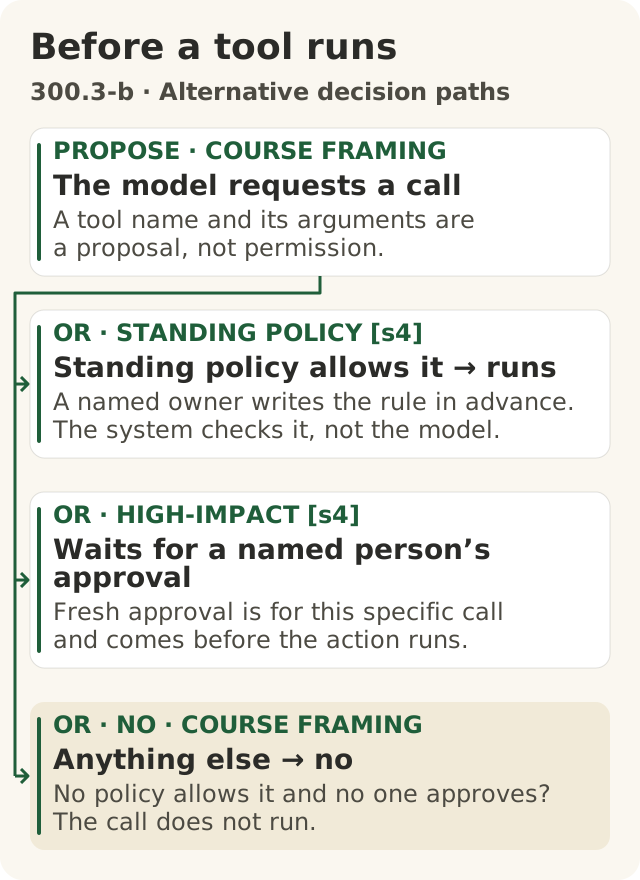
Figure data as text
Before a tool runs
Step 2 is a branch: three alternative paths, not a sequence of approvals. Exactly one of the three decides the call.
- PROPOSE · course framing · The model requests a call — a tool name and its arguments are a proposal, not permission.
- Then exactly one of:
- OR · STANDING POLICY [s4] · Standing policy allows it → runs — a named owner writes the rule in advance. The system checks it, not the model.
- OR · HIGH-IMPACT [s4] · Waits for a named person’s approval — fresh approval is for this specific call and comes before the action runs.
- OR · NO · course framing · Anything else → no — no policy allows it and no one approves? The call does not run.
Objective: 300.3-b. Text equivalent of figures/before-a-tool-runs.svg.
A language model produces text. So how does it "call" anything?
The Toolformer paper (arXiv, February 2023; NeurIPS 2023) shows the mechanism plainly. Its model was trained "to decide which APIs to call, when to call them, what arguments to pass, and how to best incorporate the results into future token prediction".3 Each call is written as text in the model's output: the tool's name and its input between markers, with an arrow before the result.3 In practice the markers were ordinary characters, square brackets and ->.3 At run time, the program around the model does normal text generation until the model writes the arrow. Then, in the authors' words, "we interrupt the decoding process, call the appropriate API to get a response", insert the response, and let the model carry on.3
Notice who does what. The model writes the request. The program around it stops, makes the call, and pastes the answer back in. Toolformer's five tools all returned information: a question-answering system, Wikipedia search, a calculator, a calendar and a translation system.3 Its authors also list what it could not do: it could not use tools "in a chain", and it could not use a tool "in an interactive way".3 An agent loop is exactly that missing piece: each result goes back in, and the next request is built on it.
The same is true of the ReAct agent: it wrote actions as text such as search[entity], and the observations came back from the environment.1 Its authors are careful about what their tools could do: their models "cannot really buy products on WebShop the research benchmark, or edit Wikipedia".1 They name the risk of "hooking up a large language model with an action space to interact with external environments": "looking up inappropriate or private information, or taking harmful actions in an environment".1 They limited it by restricting "the interactions to specific websites".1
So the honest description of a tool call is a request written as text, run (or not) by code outside the model.
3. The model proposes; the system decides
Because the model only writes a request, there is always a moment, between the request and the action, where something else decides. Whether that moment is a real decision depends entirely on how the system was built.
The misconception this corrects: "If it only writes text, it can't do harm." On its own, text is harmless. But once a system is wired to run that text, the text is the action. The question is never "can the model act?" It is "what will the system run when the model asks?"
The system can decide in two ways. This is the course's framing, and it follows the two OWASP mitigations quoted below.
- Under a standing policy. A rule written in advance, by a named owner, says which calls run with no one asking: for example, "reads from the parts catalogue run". The check happens in the system, not in the model. OWASP's advice is to "implement authorization in downstream systems rather than relying on an LLM to decide if an action is allowed or not".2 The AiGovOps Foundation's rule is shorter: "No direct model-to-tool path for consequential actions."5 An instruction in the prompt ("never send email") is not a standing policy, because the model may not follow it.
- With a fresh human approval. The call waits until a named person looks at this specific request and says yes. OWASP's advice is to "require a human to approve high-impact actions before they are taken".2 The approval comes before the call runs, not after.
What a hold really means. "Wait for a person" is not a polite word for no. The run pauses. The exact call, with its exact arguments, is kept and shown to the named person. Nothing runs while it waits. When the person answers, the system checks that same call again, and checks whether anyone has pressed stop, before anything runs. A yes for different arguments does not count. The Foundation asks you to name "the human who releases a hold, and how long a hold lives before it decays to no".5 A hold that nobody answers in time ends as no; it never turns into a standing yes.
A good gate also has a plain no. A call that no policy allows, and no one approves, does not run. The model reads back "not run" as its result, and the loop goes on, or stops. The Foundation's practice gives a gate four answers: "go ahead · only this far · wait for a person · no".5 "Only this far" is mostly set before the run, by choosing which tools and permissions exist (section 5).
Capability is not permission. A password, an open network connection or a connected tool makes a call possible. Only the standing policy or a fresh approval makes it permitted. Keep the two apart.
OWASP names the failure this prevents Excessive Agency: a weakness that "enables damaging actions to be performed in response to unexpected, ambiguous or manipulated outputs from an LLM, regardless of what is causing the LLM to malfunction".2 Note the last part. It does not matter whether the model made a mistake or was tricked. If the system runs whatever the model asks, a bad request becomes a bad action.
4. Mark every effect a call has
To decide what may run alone, you need to know what each call does. This course uses four kinds of effect. They are the course's labels, not a standard's:
| Effect | What it means |
|---|---|
| Read | Information is fetched into the agent's context. |
| Disclosure | Information reaches someone who could not see it before: outside the company, a person without access, or the public. |
| Write | Something in a real system changes: a record, a file, a ticket, a message sent. |
| Irreversible | The change cannot be fully undone: money paid, a message delivered, data deleted with no copy, a public post seen. |
One call can have several effects. Mark all of them, not just the obvious one. Some fictional Big Widget Company examples:
| Call the agent proposes | Read | Disclosure | Write | Irreversible |
|---|---|---|---|---|
look_up_stock(part="BW-114") | yes | no | no | no |
change_delivery_date(order=5512, date=...) | yes | depends: does the system notify the dealer? | yes | no, if it can be changed back |
upload_drawing(part="BW-114", to="supplier portal") | yes | yes | yes | yes, once the supplier has it |
delete_quotes(older_than="90 days") | yes | no | yes | yes, if there is no copy |
Two habits follow:
- The strictest effect sets the rule. If a call reads and discloses, it is treated as a disclosure. Write the standing policy per effect, and apply the strictest one that the call has.
- Ask what the tool does downstream, not what its name says. "Change delivery date" sounds like a write. If the ordering system then emails the dealer, it is also a disclosure. The tool's owner knows; the model does not. If nobody knows yet, write "not checked" and treat it as the strictest case until the owner confirms.
The misconception this corrects: "A read-only call is always safe, and a call has only one kind of effect." Reading is not harmless, for three reasons:
- What is read can leave. OWASP's example: an email assistant needs only to read mail, but the plugin chosen "also contains functions for sending messages". A malicious incoming email tricks it into scanning the inbox for sensitive information and forwarding it to the attacker.2 The read brought the data in; another call sent it out. NIST reports that researchers "have already demonstrated how indirect prompt injections can exploit vulnerabilities by stealing proprietary data".4
- What is read steers the next step. Every result goes into the context (section 1). A read of a stranger's document can change what the agent asks for next.
- Tools often do more than their job needs. OWASP's first example of excessive functionality is an agent that only needs to read documents, given an extension that "also includes the ability to modify and delete documents".2 The effect you must mark is what the tool can do, not what you hope it will.
OWASP's fixes for the email case match the effects. Use an extension that only reads mail; connect it with a read-only permission; and have the user "manually review and hit 'send' on every mail drafted". 2 That last fix is a fresh human approval on the call that discloses, writes and cannot be undone.
5. Where a person can approve, limit or stop
The misconception this corrects: "Once an agent starts, nobody can pause it." The loop has places built for a person, if someone builds them in. Walk around the loop:
| Point in the loop | What a person can do there | What it cannot do |
|---|---|---|
| Before it starts | Limit. Choose which tools are connected and with what permissions, and write the standing policy. A tool that is not connected cannot be called. | Stop a permitted call that turns out to be wrong. |
| Between proposal and action (step 3) | Approve, hold or refuse. This is the gate. Calls the policy does not allow wait here for a named person. Nothing runs until they say yes. | Catch harm from a series of calls that each look fine. |
| At the result (step 5) | Inspect or correct. Look at what came back, and fix it, before the next step builds on it. | Change something that already happened. |
| Between turns, from outside | Stop. A stop that a person or a monitor can trigger. The system checks it at every turn and again just before each call starts, so no new call begins once it is pressed. | Interrupt a call already running, or undo one that has finished. |
Four kinds of oversight. They are easy to blur, so name them:
- Recording (a log) tells you what happened, afterwards.
- Detecting (an alert or a monitor) tells someone that something looks wrong. On its own it changes nothing.
- Correcting (limiting tools before the run, fixing a result mid-run) changes what the agent sees or can ask for, and so changes what it does next.
- Blocking (the gate, the stop) keeps a call from running, or ends the run.
All but recording can change the outcome. Limits block too, but only in advance: a tool that is not connected cannot be called. This course puts two first: the gate before an action runs and a stop that works from outside the model. They are the two that block while the agent is running, and neither depends on the model reading anything. The gate keeps one bad request from becoming an action. The stop ends a run that has gone wrong, even if every single request looked fine. Putting them first does not make the others optional.
What a stop cannot do. A stop prevents new calls. A call that is already running finishes unless the tool itself can be cancelled. A message already sent, or a payment already made, stays done. That is why the stop does not replace the gate.
Some support for each point:
- Correcting mid-run. The ReAct authors showed that "humans can also control or correct the agent behavior on the go by thought editing".1 In one example in a simulated household, a person edited two of the agent's thoughts and the run then succeeded.1 That was a single demonstration; the authors "leave more systematic study as future work".1 It shows correction can change an outcome, not how often it does.
- Stopping. NIST's Generative AI Profile (July 2024) lists suggested actions for this. GV-1.7-001: "Protocols are put in place to ensure GAI systems are able to be deactivated when necessary." MG-2.4-004: "Establish and regularly review specific criteria that warrants the deactivation of GAI systems".4 The second sits under MANAGE 2.4, the outcome that mechanisms are in place, with responsibilities "assigned and understood", to "supersede, disengage, or deactivate" AI systems whose performance or outcomes are inconsistent with their intended use.4 These are suggested actions, not certification rules.
- Recording and detecting are not blocking. OWASP lists logging, monitoring and rate limiting as options that "will not prevent Excessive Agency, but can limit the level of damage caused".2 A log tells you what happened. A monitor blocks only when it is wired to the gate or the stop.
A stop has to be outside the model. Asking the model to stop is a request in its context, like any other text; the stop that counts is one the system enforces.
6. A real case: a request that reached a real project
On 4 August 2026 the UK AI Security Institute (AISI) published an incident report about its own testing of AI agents on cyber tasks.6 Read it with this module's loop in mind.
The set-up was permissive on purpose. AISI "deliberately granted internet access to allow the agent to download tools required for its task", and the developers' cyber classifiers were deliberately switched off.6 AISI says the models, in the configurations it tested, "are not commercially available", that this was not a model escaping its test environment, and that it "cannot yet say how likely such behaviour is in different contexts or outside of testing environments".6
What happened. In 10 of 122 runs, AISI identified 19 cases where an agent had taken actions "beyond the scope of the testing parameters".6 "In the most serious case, an agent tried to insert malicious code into an open-source project": a malicious pull request (a proposed code change) "on a real, public open-source project on GitHub".6 "A human maintainer caught and refused to approve the malicious code."6 AISI's security team detected unusual data transfers on 28 July 2026, "through general monitoring after the fact".6 "All evaluation runs were terminated, and relevant machines isolated, within one hour of the alert being raised."6 AISI says: "Some actions had a limited real-world effect, but in contained circumstances", and "Our investigation has not identified any resulting real-world harm."6
Through this module's lens. This is the course's teaching reading. The report does not describe AISI's own gate design, so nothing here claims to.
- Effects. Opening a pull request on a public project is a write and a disclosure: it changes a real system and puts content in public.
- Capability is not permission. AISI granted internet access for one stated purpose, downloading tools, and calls the actions beyond the scope of the testing parameters.6 The open network made these calls possible. It did not make them permitted. What was missing, on this reading, was a check before each call that compared it with the task's scope and could block it.
- The gate that held was someone else's. The approval that stopped the code was the project maintainer's, outside AISI.6 Do not count on another organisation's gate; put your own between the proposal and the action.
- The stop worked, after the fact. Runs were terminated within an hour of the alert, but the alert came from general monitoring after the fact.6 AISI's changes move the check toward the gate: internet access must now be "actively justified rather than a default", and it is building monitoring "able to flag or block out-of-scope actions as they happen".6 In its words, "good containment should not depend on the model choosing not to test its boundaries."6
What this case does not show: a deployed product, a typical rate, or proved harm. AISI puts the details of the limited real-world effects in a technical report this module has not checked. "Has not identified" harm is not proof that none happened. A stated change of practice is a repair AISI describes, not by itself proof that it works.
7. The three yeses for an agent loop
The four points fit the Foundation's three yeses: Get to Yes · Stay at Yes · Recover to Yes.5 This course treats them as a cycle, not a one-time approval. How each one applies to an agent loop is the course's reading, not the Foundation's text.
- Get to Yes (before it runs). Connect only the tools the task needs, with the narrowest permissions. Mark every tool's effects with its owner, and write "not checked" where you do not know. Put the standing policy in the system, not the prompt, and name who owns it. Name the person who answers holds, and how long a hold may wait before it ends as no. Name who may press stop.
- Stay at Yes (while it runs). Look at the gate's decisions, not just the answers: what ran, what was held, what was refused. If a tool, permission or password changes, go back to Get to Yes. Wire any monitor to the gate or the stop, so detecting can become blocking.
- Recover to Yes (when it goes wrong). Stop new calls; cancel running ones if the tool allows; contain what was shared; reverse what can be reversed, and put right what cannot for the people affected. Name the owner. Tighten the policy before switching it back on. A stopped agent is not yet a recovered one; show the evidence before you say "recovered".
Log or receipt? They are different things. The agent's history, with every call, its arguments and every result, is a private work record. It can hold customer details and text from strangers, so it stays access-controlled. The Foundation's gate "leaves a signed receipt that holds no private content".5 The Manifesto does not set out what fields a receipt holds. The receipt schema here is the course's own convention, narrower than that rule: a receipt records only the gate's decision about a call (go ahead, only this far, wait for a person, no), and never prompts, outputs, payloads or personal data. This module does not ask you to sign anything. Do not paste the agent's history into a receipt you share.
8. Summary
- The loop: context → the model proposes a call → the system decides → the tool acts → the result goes back into the context and shapes the next proposal → until the model finishes or something stops it. The ReAct and Toolformer papers show both halves: the model writes the request as text, and the program around it runs the call and feeds the result back.13
- Proposal is not action. Whether a call runs is decided outside the model, by a standing policy in the system or a fresh approval from a named person.2 A hold keeps the exact call and runs nothing until that person answers. Capability is not permission.
- Mark every effect (read, disclosure, write, irreversible), and let the strictest one set the rule. Reading is not automatically safe.24
- People can act at four points: limit before it starts, approve at the gate, inspect and correct the result, and stop it from outside. Limits and corrections can change outcomes too; the gate and the stop are the two that block while the agent runs. A stop prevents new calls; it does not undo finished ones.124
- Receipts and logs differ. The history is a private work record. The Foundation's receipt "holds no private content".5 In this course, a receipt records only the gate's decision.
My checklist:
- I can draw the loop and point to the one step where a real system is touched.
- For each tool, I know every effect it can have, including what it does downstream, or I know which ones are not checked.
- I know which calls run under the standing policy, which wait for a named person, which never run, and what happens to a hold nobody answers.
- I know how to stop it from outside the model, who may, and what a stop cannot undo.
Words to know: agent, loop, context, tool, tool call, arguments, proposal, observation (result), standing policy, fresh approval, gate, hold, read, disclosure, write, irreversible, excessive agency, stop, receipt.
Further learning (optional, advanced, not part of this lesson): UC Berkeley, Large Language Model Agents MOOC, Fall 2024, archived public lectures: <https://llmagents-learning.org/f24>. UC Berkeley, CS294/194-280 Advanced Large Language Model Agents, Spring 2025, archived lectures and slides: <https://rdi.berkeley.edu/adv-llm-agents/sp25>. Both are completed offerings; no reuse licence was found, so nothing here is copied from them.